


Architecture diagrams serve as the blueprint for software systems. They translate abstract logic into visual structures that teams can understand, discuss, and build upon.
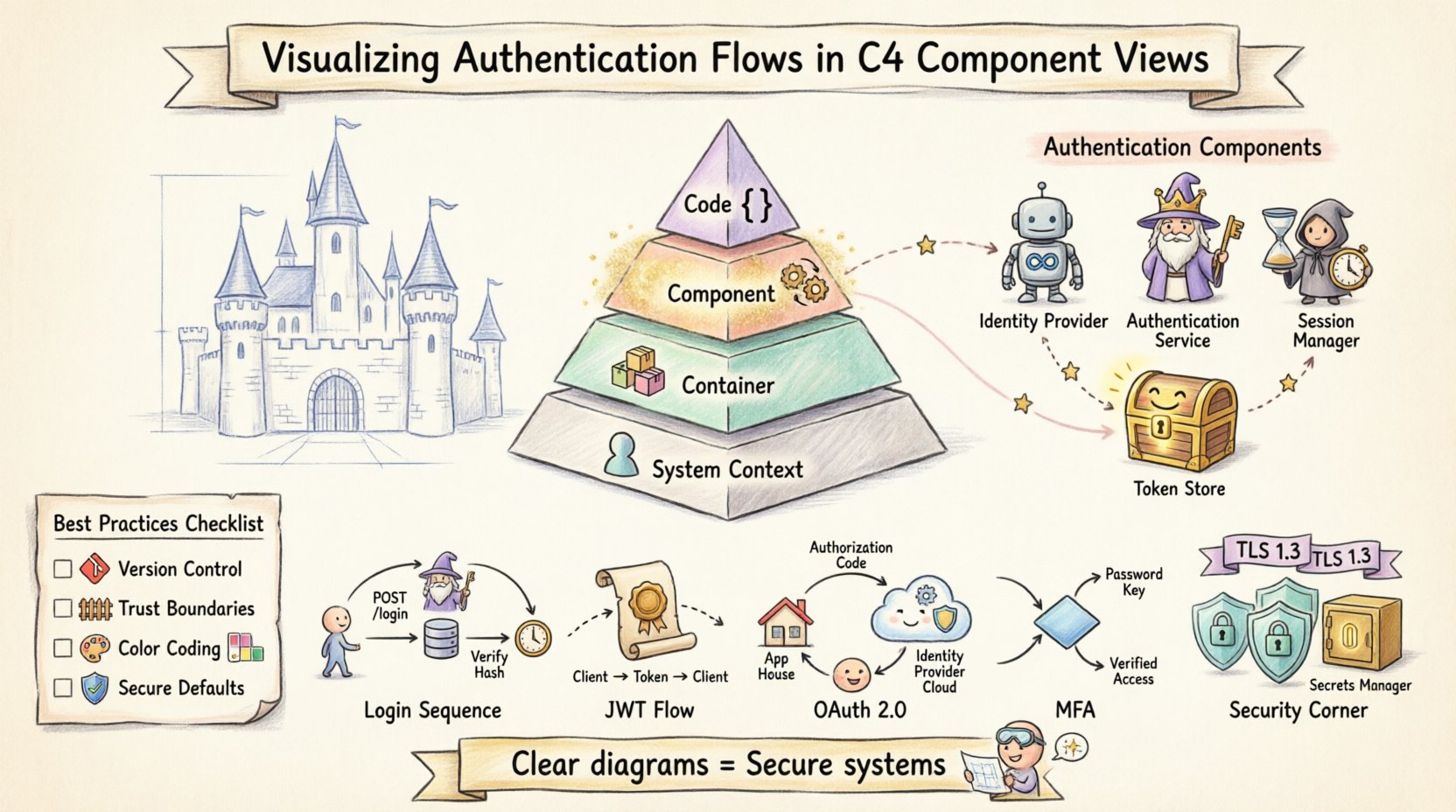
Quick Takeaway: This guide provides practical, tool-agnostic strategies for representing authentication logic within the C4 Component View—helping teams document security-critical processes with clarity, precision, and long-term maintainability.
🧩 Understanding the C4 Model Context
The C4 model organizes architecture documentation into four progressive levels of abstraction [[8]]:
| Level | Focus | Typical Audience |
|---|---|---|
| System Context | The system as a single box + relationships with people/external systems | Executives, stakeholders |
| Container | High-level software containers (web apps, APIs, databases, mobile apps) | Architects, DevOps |
| Component | Cohesive functional units inside containers | Developers, security engineers |
| Code | Classes, interfaces, and internal structure | Developers implementing features |
Authentication logic is critical enough that it demands attention at both Container and Component levels. While the Container View might show where authentication endpoints exist, the Component View reveals the internal mechanics of how credentials are processed, validated, and secured.
💡 Pro Tip: Start at Level 1 (System Context) and work downward—this ensures your Component diagrams remain grounded in business context [[2]].
🔍 Why the Component View for Authentication?
The Component View strikes the ideal balance for documenting authentication: granular enough to expose security logic, yet abstract enough to remain maintainable.
Key Advantages:
| Benefit | Why It Matters for Auth |
|---|---|
| Logic Visibility | Exposes services handling login, token generation, session validation |
| Interaction Clarity | Clarifies frontend ↔ backend security service communication |
| Boundary Definition | Explicitly marks trusted system boundaries vs. external dependencies |
| Security Auditing | Provides a reference for threat modeling and compliance reviews |
When documenting authentication, you’re not just drawing boxes—you’re documenting the flow of sensitive data. A well-crafted component diagram reduces ambiguity about where secrets live, how they travel, and who can access them.
🎯 Best Practice: Limit scope to 6–12 components per diagram. If your auth system is complex, create focused sub-views (e.g., “Authentication Slice”) [[1]].
📦 Defining Authentication Components
To visualize authentication effectively, identify distinct components by function, not implementation.
Core Identity Components
| Component | Responsibility | Typical Interactions |
|---|---|---|
| Identity Provider | Issues credentials/tokens (external or internal) | OAuth redirects, token issuance |
| Authentication Service | Verifies credentials (password hashing, MFA) | Queries User Store, signals Session Manager |
| Session Manager | Creates, maintains, destroys user sessions | Reads/writes session state, integrates with cache |
| Token Store | Repository for refresh tokens, blacklists | Validates token revocation, supports rotation |
| User Credential Store | Secure storage for hashed passwords, profile data | Queried by Auth Service during login |
External Dependencies: Visual Representation Guide
| Component Type | Diagram Representation | Example Label |
|---|---|---|
| External System | Rectangle with “External” border/icon | Identity Provider (Auth0) |
| Database | Cylinder shape | User Credential Store (PostgreSQL) |
| API Endpoint | Box with arrow indicators | POST /auth/login |
| Secrets Manager | Locked box icon | Vault / AWS Secrets Manager |
⚠️ Critical: Always show external identity sources—even third-party providers like Auth0 or Okta—to clarify trust boundaries [[28]].
🔄 Visualizing Specific Authentication Flows
Static diagrams show structure; flows add dynamic context. Use directed, labeled arrows to represent requests/responses.
1️⃣ The Login Sequence (Credential-Based)
[Frontend] --POST /login--> [Authentication Service]
[Authentication Service] --query--> [User Credential Store]
[User Credential Store] --return hash--> [Authentication Service]
[Authentication Service] --validate--> [Authentication Service]
[Authentication Service] --create session--> [Session Manager]
[Session Manager] --return session ID--> [Frontend]
Diagram Labels:
-
Arrows:
POST /login,Verify Hash (bcrypt),Create Session -
Data notes:
Password (encrypted in transit),Session ID (HTTP-only cookie)
2️⃣ Token-Based Authentication (JWT)
[Frontend] --POST /login--> [Authentication Service]
[Authentication Service] --generate JWT--> [Token Generator]
[Authentication Service] --return JWT--> [Frontend]
[Frontend] --GET /api/data + JWT--> [API Gateway]
[API Gateway] --validate signature--> [Token Validator]
[Token Validator] --allow/deny--> [API Gateway]
Visual Conventions:
-
Use dashed arrows for token transmission (client-held credential)
-
Label validation steps:
Verify RS256 Signature,Check Expiration -
Distinguish initial auth vs. subsequent protected requests
3️⃣ OAuth 2.0 Flows (Third-Party Integration)
[Frontend] -redirect-> [Identity Provider (External)]
[Identity Provider] -user authenticates-> [Identity Provider]
[Identity Provider] -callback + auth code-> [Frontend]
[Frontend] -POST /token + code-> [Authentication Service]
[Authentication Service] -exchange code-> [Identity Provider]
[Identity Provider] -return access token-> [Authentication Service]
[Authentication Service] -issue session-> [Frontend]
Diagram Tips:
-
Represent Identity Provider as an external component with distinct border style
-
Draw a loop arrow for redirect/callback cycle
-
Clearly label:
Authorization Code,Token Exchange,Scope: read:user
4️⃣ Multi-Factor Authentication (MFA)
[Frontend] --POST /login--> [Authentication Service]
[Authentication Service] --verify password--> [User Credential Store]
[Authentication Service] --MFA required?--> {Decision Node}
{Decision Node} --Yes--> [MFA Component]
[MFA Component] --send code--> [Email/SMS Service]
[Frontend] --POST /mfa/verify + code--> [MFA Component]
[MFA Component] --validate--> [Authentication Service]
[Authentication Service] --create session--> [Session Manager]
Visual Best Practices:
-
Use a diamond decision node for conditional MFA logic
-
Color-code sensitive paths (e.g., red for MFA verification)
-
Include timeout/expiration notes on MFA tokens
🔒 Security Considerations in Diagrams
A diagram is a map of trust, not just data. Explicitly mark security boundaries.
Encryption & Transport Security
| Connection Type | Visual Indicator | Label Example |
|---|---|---|
| In Transit (Internal) | Lock icon + solid line | TLS 1.3 |
| In Transit (External) | Lock icon + dashed line | HTTPS + mTLS |
| At Rest (Database) | Cylinder with lock overlay | AES-256 Encrypted |
✅ Rule: All arrows crossing trust boundaries must show encryption indicators.
Secrets Management Visualization
| Secret Type | Recommended Diagram Representation |
|---|---|
| API Keys / Client Secrets | Link to Secrets Manager component |
| Database Credentials | Note: Injected via env vars at runtime |
| JWT Signing Keys | Show as Key Management Service dependency |
| Never | Hardcoded values in component boxes |
🚫 Anti-Pattern: Avoid implying secrets live in code. Use a generic
Configuration Sourcecomponent if injection details are implementation-specific.
🛑 Common Pitfalls to Avoid
| Pitfall | Why It’s Problematic | Correction |
|---|---|---|
Generic Labels ("Process", "Handle") |
Obscures security-critical actions | Use precise verbs: "Validate JWT Signature", "Hash Password (argon2)" |
| Missing External Dependencies | Creates false sense of self-containment | Always show Identity Providers, email services, etc. |
| Ignoring Token Lifecycle | Overlooks refresh/revocation logic | Include Token Refresh and Blacklist Check flows |
| Over-Engineering the View | Reduces readability and maintainability | Keep Component View focused on logic; move class details to Code View [[5]] |
| Inconsistent Notation | Confuses readers across diagrams | Document and enforce a team style guide [[3]] |
📝 Best Practices for Maintainable Documentation
-
Standardize Notation
Define arrow styles, icons, and color meanings in a shared legend. Consistency reduces cognitive load [[4]]. -
Treat Diagrams as Code
Store diagrams in version control (e.g., PlantUML, Structurizr DSL). Track changes alongside auth logic updates [[24]]. -
Integrate with Review Processes
Require diagram updates in PRs that modify authentication flows. “If the code changes, the diagram changes.” -
Highlight Trust Boundaries
Use bold borders or background shading to mark where system trust ends. This aids threat modeling [[14]]. -
Use Color Sparingly & Semantically
Reserve colors for security states:-
🔴 Red: Sensitive data / high-risk operations
-
🟢 Green: Public endpoints / low-risk
-
🔵 Blue: Internal trusted communication
Avoid using color as the only differentiator (accessibility).
-
-
Include a “Last Updated” Timestamp
Authentication requirements evolve rapidly. Timestamps signal diagram freshness.
🧠 Detailed Flow Examples
Example 1: User Registration Flow
[Frontend] --POST /register--> [Registration Component]
[Registration Component] --validate format--> [Validation Rules]
[Registration Component] --check uniqueness--> [User Credential Store]
[Registration Component] --hash password--> [Password Hasher (argon2)]
[Registration Component] --write user record--> [User Credential Store]
[Registration Component] --send verification--> [Email Service (External)]
[Email Service] --user clicks link--> [Verification Endpoint]
[Verification Endpoint] --activate account--> [User Credential Store]
Key Diagram Notes:
-
Show
Email Serviceas external—clarifies async dependency -
Label hashing algorithm: critical for security audits
-
Include validation rules as a component if complex (e.g., password policy engine)
Example 2: Token Refresh with Rotation
[Frontend] --POST /refresh + refresh_token--> [Authentication Service]
[Authentication Service] --validate signature--> [Token Validator]
[Authentication Service] --check revocation--> [Token Store (Blacklist)]
[Authentication Service] --generate new tokens--> [Token Generator]
[Authentication Service] --invalidate old refresh token--> [Token Store]
[Authentication Service] --return new access + refresh tokens--> [Frontend]
Security Highlights:
-
Explicitly show token rotation (old refresh token invalidated)
-
Label revocation check: prevents replay attacks
-
Note token expiration times in component descriptions
Example 3: Session Invalidation (Logout)
[Frontend] --POST /logout + session_id--> [Session Manager]
[Session Manager] --add to blacklist--> [Token Store]
[Session Manager] --delete session data--> [Session Cache (Redis)]
[Session Manager] --confirm termination--> [Frontend]
[API Gateway] --future request + blacklisted token--> [Token Validator]
[Token Validator] --reject--> [API Gateway] --401 Unauthorized--> [Frontend]
Why This Matters:
Visualizing server-side cleanup prevents the misconception that “logout = client-side only.” Critical for defending against token theft.
📊 Comparing Auth Strategies: Diagram Focus Guide
| Strategy | Primary Diagram Focus | Key Component to Highlight | Visual Cue |
|---|---|---|---|
| Session-Based | Server-side state management | Session Store (Redis/DB) |
Solid arrow for session lookup |
| Token-Based (JWT) | Cryptographic validation | Token Validator + Key Manager |
Dashed arrow for token transmission |
| OAuth 2.0 / OIDC | Redirect/callback orchestration | Identity Provider (External) |
Loop arrow for auth code flow |
| Passwordless (WebAuthn) | Challenge/response protocol | Authenticator Attestation Service |
Icon for hardware key / biometric |
🔍 Pro Insight: AI-powered tools can now generate C4 diagrams from natural language descriptions, following model conventions automatically [[7]]. Consider leveraging these for initial drafts—but always review for security accuracy.
🚀 Conclusion: Visualization as a Security Practice
Visualizing authentication flows transcends aesthetics—it’s a security communication discipline. By anchoring diagrams in the C4 Component View, you create living documentation that serves:
-
✅ Developers: Clear implementation guidance
-
✅ Security Engineers: Auditable trust boundaries
-
✅ New Hires: Accelerated onboarding
-
✅ Incident Responders: Rapid context during breaches
Final Checklist Before Publishing a Diagram:
-
Does every arrow crossing a trust boundary show encryption?
-
Are secrets never implied to live in code?
-
Are external dependencies explicitly marked?
-
Does the diagram reflect the current auth logic (not legacy)?
-
Is there a version/timestamp for traceability?
🌟 Remember: When you draw a connection line, ask: “Does this represent a trusted channel?” When you draw a box, ask: “Does this component handle sensitive data?” These questions transform diagrams from static artifacts into active security tools.
By adopting these practices, your architecture documentation becomes a proactive asset—fostering security awareness, reducing miscommunication, and ensuring your authentication flows remain robust, understandable, and maintainable as your system evolves.
📚 Reference List
- C4 Diagram Tool by Visual Paradigm – Visualize Software Architecture with Ease: This resource highlights a tool that enables software architects to create clear, scalable, and maintainable system diagrams using the C4 modeling technique.
- Ultimate Guide to C4 Model Visualization Using Visual Paradigm’s AI Tools: This guide explains how to leverage artificial intelligence to automate and enhance the visualization of the C4 model for smarter architecture design.
- Leveraging Visual Paradigm’s AI C4 Studio for Streamlined Architecture Documentation: An exploration of the AI-enhanced C4 Studio, which allows teams to create clean, scalable, and highly maintainable software architecture documentation.
- Beginner’s Guide to C4 Model Diagrams: A step-by-step tutorial designed to help beginners create C4 model diagrams across all four levels of abstraction: Context, Containers, Components, and Code.
- The Ultimate Guide to C4-PlantUML Studio: Revolutionizing Software Architecture Design: This article discusses the integration of AI-driven automation with PlantUML’s flexibility to streamline the software architecture design process.
- A Comprehensive Guide to Visual Paradigm’s AI-Powered C4 PlantUML Studio: A detailed guide explaining how this specialized studio transforms natural language into accurate, layered C4 diagrams.
- C4-PlantUML Studio: AI-Powered C4 Diagram Generator: This feature overview describes an AI tool that automatically generates C4 software architecture diagrams directly from simple text descriptions.
- Comprehensive Tutorial: Generating and Modifying C4 Component Diagrams with AI Chatbot: A hands-on tutorial demonstrating how to use an AI-powered chatbot to generate and refine C4 component diagrams through a real-world case study.
- Visual Paradigm Full C4 Model Support Release: An official announcement regarding the inclusion of comprehensive C4 model support for managing architecture diagrams at multiple abstraction levels within the platform.
- C4 Model AI Generator: Automating Diagrams for DevOps and Cloud Teams: This article discusses how conversational AI prompts automate the full C4 modeling lifecycle, ensuring consistency and speed for technical teams.
Related posts:
 The C4 Model: Visualizing Software Architecture Like “Google Maps for Code”
 The Complete Guide to the C4 Model: Visualizing Software Architecture with Clarity and Purpose
 Comprehensive Guide to Modeling Event-Driven Architectures with C4 Model
 C4 Model: A Practical Guide to Defining System Context Boundaries in Software Architecture