


Introduction
Designing distributed systems requires clarity. When architecture relies on asynchronous communication, visualizing the flow of data becomes complex. The C4 Model offers a structured approach to software architecture documentation. However, standard C4 diagrams often struggle to represent the nuances of Event-Driven Architecture (EDA). This guide explores how to adapt C4 relationship lines to accurately depict event flows, producers, and consumers without ambiguity. We will focus on semantic precision, ensuring that stakeholders can understand the system behavior at a glance.
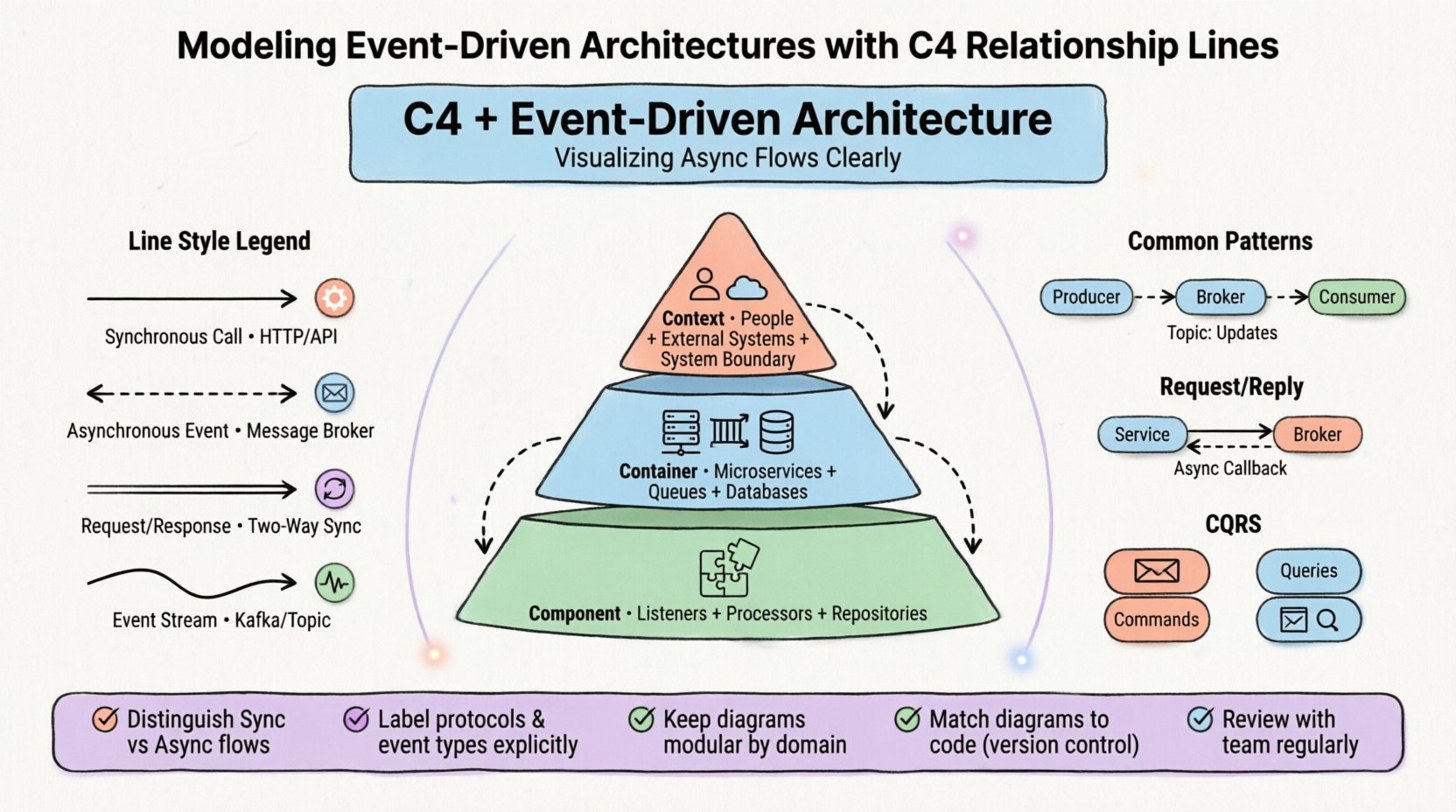
Chapter 1: Why Standard C4 Needs Adaptation for EDA
The Challenge of Asynchronous Communication
Traditional C4 diagrams excel at showing data movement between containers using solid lines. In a synchronous request-response pattern, this is intuitive. A request goes in, and a response comes out. Event-Driven Architecture introduces a layer of indirection. A producer emits an event, and one or more consumers process it later. The connection is often loose, and the timing is decoupled.
Understanding Flow Types
To effectively model EDA, you must distinguish between three critical flow characteristics:
Synchronous Flows:
-
Direct calls where the caller waits for a result
-
Typically HTTP/RPC-based
-
Immediate response expected
-
Tight coupling between services
Asynchronous Flows:
-
Fire-and-forget events where the producer does not wait
-
Message broker-based communication
-
Eventual consistency
-
Loose coupling between services
Push vs. Pull:
-
Does the service send data proactively?
-
Or does it fetch data on demand?
-
Critical for understanding system behavior
Using a standard solid line for an event stream can mislead readers into thinking the connection is synchronous. This creates confusion during troubleshooting or onboarding. To resolve this, we must modify the visual language of the relationship lines.
Chapter 2: Understanding the C4 Levels in an Event Context
Before drawing lines, we must understand the boxes they connect. Each level of the C4 Model serves a different audience and abstraction layer.
2.1 Context Level: The Big Picture
At the highest level, you define the system boundary. In an event-driven system, the System is often a collection of services reacting to external stimuli.
Key Elements:
-
People: Users triggering actions (e.g., clicking a button)
-
External Systems: Third-party APIs or legacy systems feeding data in
-
The System: The aggregate of all event producers and consumers
Relationship Focus:
Relationship lines here should focus on integration points. If a human clicks a button, that is a request. If a payment gateway sends a webhook, that is an event. Distinguishing these at the context level prevents confusion about what triggers the system.
Best Practices:
-
Keep the Context level simple
-
Show only major integrations
-
Clearly label event sources vs. request sources
-
Avoid technical implementation details
2.2 Container Level: Services and Streams
This is where the magic happens. Containers represent deployable units (applications, databases, queues). In EDA, this level must show how services talk to message brokers or other services.
Container Types in EDA:
-
Application Containers: Microservices handling business logic
-
Data Containers: Databases or event stores
-
Queue/Topic Containers: Message brokers acting as intermediaries
Critical Relationship Lines:
Relationship lines here are critical. They represent the Event Channels. A solid line implies a direct API call. A dashed line implies an event subscription. This distinction is vital for developers understanding latency and reliability.
Key Considerations:
-
Show message brokers explicitly
-
Indicate event channels clearly
-
Distinguish between publishers and subscribers
-
Document protocols (Kafka, RabbitMQ, etc.)
2.3 Component Level: Internal Logic
Inside a container, components handle specific responsibilities. In EDA, components often include event listeners, handlers, and transformers.
Component Types:
-
Event Listeners: Components that wait for incoming messages
-
Processors: Components that transform event data
-
Repositories: Components that persist state changes
Internal Flow Visualization:
Relationship lines at this level show data flow within the service. They help developers trace how an event transforms into a database update.
Focus Areas:
-
Event handling logic
-
Data transformation steps
-
State management
-
Error handling paths
Chapter 3: Semantics of Relationship Lines in EDA
The most common source of error in architecture diagrams is ambiguous line styles. In the C4 Model, lines typically represent data flow. In EDA, we need to differentiate between control flow and data flow, and between sync and async.
3.1 Defining Line Styles
| Line Style | Meaning | Use Case |
|---|---|---|
| Solid Line | Synchronous Call | API Request / HTTP Call |
| Dashed Line | Asynchronous Event | Message Broker Subscription |
| Double Line | Two-Way Sync | Request / Response Pattern |
| Curved Line | Event Stream | Kafka / Topic Subscription |
3.2 Labeling Relationships
Labels on lines provide context. A generic “Data” label is insufficient. Be specific about the Protocol and the Direction.
Effective Label Examples:
-
HTTP POST: Indicates a synchronous push
-
WebSocket: Indicates a persistent connection
-
Event: OrderCreated: Specifies the event type
-
Topic: Orders: Specifies the logical channel
Labeling Best Practices:
When labeling, avoid vague terms. Instead of “Data Flow”, use “Order Events”. This reduces cognitive load for the reader.
Recommended Label Format:
[Protocol]: [Event/Action Name]
Example: Kafka: PaymentProcessed
Example: HTTP GET: GetCustomerDetails
Example: WebSocket: RealTimeUpdates
3.3 Direction Indicators
Use arrows to clearly indicate:
-
Unidirectional flow: Single arrow (Producer → Consumer)
-
Bidirectional flow: Double-headed arrows (Request/Response)
-
Publish-Subscribe: Multiple arrows from broker to consumers
Chapter 4: Common Patterns and Their Diagrammatic Representation
Event-Driven Architectures follow specific patterns. Each pattern has a distinct visual representation in the C4 Model. Understanding these patterns helps in creating consistent documentation.
4.1 Pub/Sub (Publish-Subscribe)
In this pattern, a producer sends an event to a broker. Consumers subscribe to topics.
Visual Representation:
-
Dashed lines from Producer to Broker
-
Dashed lines from Broker to Consumer
-
Label: “Topic: InventoryUpdates”
Meaning: The producer does not know which consumers exist.
Diagram Elements:
[Producer] --(dashed)--> [Message Broker]
[Message Broker] --(dashed)--> [Consumer 1]
[Message Broker] --(dashed)--> [Consumer 2]
Label: "Topic: InventoryUpdates"
4.2 Request/Reply over Events
One service sends an event and waits for a response event. This is often used for long-running operations.
Visual Representation:
-
Solid line to Broker
-
Dashed line back from Broker
-
Label: “Request: CalculateTax” → “Response: TaxCalculation”
Meaning: Asynchronous communication with a callback.
Diagram Elements:
[Service A] --(solid)--> [Message Broker] --(dashed)--> [Service B]
[Service B] --(dashed)--> [Message Broker] --(dashed)--> [Service A]
Labels: "Request: CalculateTax" / "Response: TaxCalculation"
4.3 Event Sourcing
State is derived from a sequence of events stored in an event store.
Visual Representation:
-
Container connected to an Event Store container
-
Label: “Append Events”
Meaning: The source of truth is the log, not the current state.
Diagram Elements:
[Application] --(solid)--> [Event Store]
Label: "Append Events"
[Event Store] --(dashed)--> [Read Model]
Label: "Project Events"
4.4 CQRS (Command Query Responsibility Segregation)
Separation of write and read models. Commands update state; Queries read state.
Visual Representation:
-
Two distinct paths
-
Write path (Command Handler) vs Read path (Read Model)
-
Label: “Command: CreateOrder” vs “Query: GetOrderDetails”
Meaning: Optimized for different types of access.
Diagram Elements:
[Client] --(solid)--> [Command Handler] --(dashed)--> [Write Database]
[Client] --(solid)--> [Query Handler] --(solid)--> [Read Database]
Labels: "Command: CreateOrder" / "Query: GetOrderDetails"
Chapter 5: Leveraging Visual Paradigm for C4 EDA Modeling
Visual Paradigm has emerged as a comprehensive solution for modeling complex architectures, including Event-Driven Architectures using the C4 Model. The platform offers both desktop and cloud-based tools with integrated AI capabilities that significantly enhance the modeling process.
5.1 Full C4 Model Support
Visual Paradigm now offers full, dedicated support for all six C4 Model Diagrams: System Context, Container, Component, Deployment, Dynamic, and Landscape [[1]]. This comprehensive support is crucial for EDA modeling because:
System Context Diagrams:
-
Define system boundaries for event-driven systems
-
Identify external event sources and consumers
-
Map human actors and their event triggers
Container Diagrams:
-
Visualize microservices and message brokers
-
Show event channels and data stores
-
Distinguish between synchronous and asynchronous communication
Component Diagrams:
-
Detail event handlers and processors
-
Show internal event flow within services
-
Map component interactions
Dynamic Diagrams:
-
Critical for EDA: Visualize event flows over time
-
Show sequence of event processing
-
Illustrate async interactions between components
Deployment Diagrams:
-
Map physical infrastructure for message brokers
-
Show service distribution across nodes
-
Plan scalability for event processing
Landscape Diagrams:
-
Provide high-level view of event-driven ecosystem
-
Show relationships between multiple systems
-
Identify integration points
5.2 AI-Powered Diagram Generation
Visual Paradigm’s AI Diagram Generator revolutionizes software architecture documentation by supporting all six essential views [[7]]. This is particularly valuable for EDA modeling:
AI C4 Model Generator Features:
The AI Diagram Generator allows you to instantly generate the entire C4 Model suite of diagrams simply by providing a topic [[4]]. For EDA, this means:
-
Rapid Prototyping:
-
Describe your event-driven system in natural language
-
AI generates initial C4 diagrams automatically
-
Focus on refinement rather than starting from scratch
-
-
Intelligent Abstraction:
-
Select the specific C4 level you need
-
AI automatically creates diagrams with correct abstraction
-
Targets appropriate stakeholders (executives vs. engineers)
-
-
Consistent Notation:
-
AI applies C4 standards consistently
-
Ensures proper use of relationship lines
-
Maintains labeling conventions
-
How to Use AI for EDA Modeling:
Step 1: Access AI Generation
   Tools > AI Diagram Generation > C4 Model

Step 2: Select Diagram Type
   Choose from: Context, Container, Component,
   Dynamic, Deployment, or Landscape

Step 3: Define Your System
   Example: "Event-driven order processing system
   with Kafka message broker, order service,
   inventory service, and notification service"

Step 4: Specify Stakeholder Audience
   - General Readers (Context/Landscape)
   - Engineers (Component/Deployment)

Step 5: Generate and Refine
   AI creates initial diagram
   Review and adjust relationship lines
   Add specific event labels
Example AI Prompts for EDA:
-
“Generate a C4 Container diagram for a pub/sub system with event sourcing”
-
“Create a C4 Dynamic diagram showing asynchronous order processing flow”
-
“Generate a C4 Component diagram for a CQRS-based inventory management system”
5.3 AI Chatbot for Architecture Modeling
Visual Paradigm Online integrates AI intelligence directly into its AI Chatbot, which examines your current model and interprets your latest instruction in context [[15]].
Chatbot Capabilities for EDA:
-
Conversational Diagram Creation:
-
“Add an event listener component to the order service”
-
“Create a message broker container for event routing”
-
“Show the event flow from payment service to notification service”
-
-
Context-Aware Updates:
-
AI understands existing diagram structure
-
Maintains naming consistency
-
Preserves connection logic
-
Ensures visual organization
-
-
Alignment and Consistency:
-
AI analyzes relationships between components
-
Ensures structural integrity across layers
-
Detects and prevents misalignment
-
Maintains coherence as architecture evolves
-
Example Chatbot Interactions:
You: "Add a dead-letter queue for failed events"
AI: Adds DLQ container with appropriate connections

You: "Show retry mechanism for payment events"
AI: Creates retry flow with proper async indicators

You: "Add event sourcing to the order container"
AI: Integrates event store with append/projection flows
5.4 Professional C4 Modeling Features
Beyond AI, Visual Paradigm provides robust professional modeling capabilities:
Sub-Diagrams Feature:
Decompose a system into containers, and containers into components, creating a traceable hierarchy of diagrams [[2]]. For EDA:
-
Drill down from Context to Container level
-
Expand containers into detailed components
-
Maintain traceability across levels
-
Navigate between related diagrams seamlessly
Custom Attributes:
Use stereotypes and tagged values to add custom data to your model elements [[2]]:
-
Add event schema information
-
Document message formats
-
Specify QoS requirements
-
Track event versioning
Diagram Validation:
-
Syntax validation ensures correct C4 notation
-
Checks for missing relationships
-
Identifies inconsistent labeling
-
Validates async vs sync flow distinctions
5.5 AI-Powered PlantUML Studio
Visual Paradigm offers an innovative, browser-based AI-Powered PlantUML Studio that transforms simple text descriptions into full suites of interactive C4 diagrams [[2]].
Workflow for EDA:
-
Project Setup & Content Creation:
-
Name your project
-
Use AI to generate initial architecture description
-
Or manually enter detailed EDA specifications
-
-
Select Diagram and Dependencies:
-
Choose specific C4 level (Context, Container, etc.)
-
For nested diagrams, select parent element first
-
Ensures accuracy in event flow representation
-
-
Generate, Preview, and Switch:
-
Click ‘Generate Diagram’
-
View PlantUML code (left) and rendered diagram (right)
-
Results saved for easy comparison
-
Iterate quickly through design options
-
5.6 Collaboration and Version Control
Visual Paradigm supports team collaboration essential for EDA projects:
Team Collaboration:
-
Multiple architects can work on diagrams simultaneously
-
Comment and review features for stakeholder feedback
-
Ensure visual language matches team’s mental model
-
Facilitate cross-functional understanding
Version Control Integration:
-
Store diagram files in same repository as code
-
Update diagrams in same commit as feature additions
-
Track changes over time
-
Maintain documentation alongside implementation
Maintenance Considerations:
-
Automated diagram generation reduces maintenance burden
-
Manual review ensures semantic accuracy
-
Regular updates keep documentation current
-
Integration with Definition of Done
Chapter 6: Pitfalls and Anti-Patterns to Avoid
Even with the right tools, mistakes happen. Common errors in C4 modeling for EDA can lead to architectural drift or misunderstanding.
6.1 Over-Abstraction
Problem: Drawing too many connections at the Context level.
Solution: Keep the Context level simple. Only show major integrations.
Visual Paradigm Support:
-
Use AI to generate appropriate abstraction level
-
Select stakeholder audience to guide complexity
-
Leverage sub-diagrams for detailed views
6.2 Mixing Sync and Async
Problem: Using solid lines for async calls confuses developers about latency expectations.
Solution: Strictly enforce line style conventions:
-
Solid = Synchronous
-
Dashed = Asynchronous
-
Curved = Event Stream
Visual Paradigm Support:
-
AI applies consistent notation automatically
-
Validation tools detect inconsistent line styles
-
Templates enforce proper conventions
6.3 Missing Error Flows
Problem: Diagrams often show happy paths only.
Solution: Include lines for:
-
Error handling
-
Retries
-
Dead-letter queues
-
Circuit breakers
Visual Paradigm Support:
-
AI Chatbot can add error flows on request
-
Dynamic diagrams show failure scenarios
-
Component diagrams detail error handlers
6.4 Ignoring Data Consistency
Problem: Failing to show where data is stored. In EDA, eventual consistency is key.
Solution: Show where the source of truth lies:
-
Event stores
-
Read models
-
Write databases
-
Caches
Visual Paradigm Support:
-
Deployment diagrams show data distribution
-
Container diagrams distinguish data stores
-
Custom attributes document consistency models
6.5 Too Many Lines
Problem: A “spaghetti diagram” is useless. If a diagram has more than 20 relationships, it’s overwhelming.
Solution:
-
Break down by domain
-
Create focused diagrams
-
Use sub-diagrams for detail
-
Apply modular approach
Visual Paradigm Support:
-
Sub-diagram feature enables modular design
-
Navigate between related diagrams easily
-
Maintain hierarchy without clutter
-
AI helps generate focused, domain-specific diagrams
Chapter 7: Tooling and Maintenance Considerations
Creating diagrams is only half the work. Maintaining them is crucial. If the diagram does not match the code, it becomes documentation debt.
7.1 Version Control Strategy
Best Practice: Store diagram files in the same repository as the code.
Benefits:
-
Ensures diagram updates happen with code changes
-
Single source of truth
-
Easy to track evolution
-
Simplifies code review process
Visual Paradigm Support:
-
Export diagrams in version-control-friendly formats
-
PlantUML integration for text-based diagrams
-
Support for standard file formats
7.2 Automation Opportunities
Code-to-Diagram Generation:
Some tools allow generating diagrams from code annotations. This reduces the maintenance burden. However, manual review is still necessary to ensure semantic accuracy.
Visual Paradigm AI Features:
-
AI generates initial diagrams from descriptions
-
Reduces manual creation time
-
Ensures C4 standard compliance
-
Requires human validation for accuracy
Diagram-to-Code Generation:
-
Generate PlantUML code from visual diagrams
-
Maintain synchronization
-
Support documentation-as-code practices
7.3 Collaboration Workflow
Review Process:
Diagrams are communication tools. They should be reviewed by:
-
Architects (technical accuracy)
-
Developers (implementation feasibility)
-
Product managers (business alignment)
Visual Paradigm Collaboration Features:
-
Cloud-based sharing
-
Comment and annotation tools
-
Real-time collaboration
-
Stakeholder-specific views
Feedback Integration:
-
Ensure visual language matches team’s mental model
-
Incorporate diverse perspectives
-
Build shared understanding
-
Improve diagram clarity
7.4 Documentation Lifecycle
Definition of Done:
Integrate diagram updates into the Definition of Done. If a code change introduces a new event, the diagram must be updated in the same pull request.
Implementation:
-
Add diagram review to PR checklist
-
Assign documentation ownership
-
Schedule regular diagram audits
-
Automate where possible
Visual Paradigm Support:
-
AI Chatbot enables quick updates
-
Sub-diagrams allow focused changes
-
Templates ensure consistency
-
Validation catches errors early
Chapter 8: Deep Dive – Component Level Relationships
The Component level often gets overlooked in EDA. It is where the event handling logic resides. Clear relationships here help developers understand internal coupling.
8.1 Event Handlers
An event handler is a component that listens for specific events. In the diagram, this is a box inside a container.
Characteristics:
-
Input: Incoming event data
-
Output: Database writes or new events
-
Relationship: Use a dashed line to show the trigger
Visual Paradigm Component Modeling:
-
Create component diagrams within containers
-
Use custom attributes to specify event types
-
Show handler subscriptions clearly
-
Link to external event sources
Example:
[OrderCreated Handler]
  Input: OrderCreated event (dashed line from broker)
  Process: Validate order data
  Output: Write to Orders DB (solid line)
  Output: Publish OrderValidated event (dashed line to broker)
8.2 Domain Services
These components contain business logic. They are often triggered by event handlers.
Characteristics:
-
Input: Data from the event handler
-
Output: State changes or notifications
-
Relationship: Solid lines for internal method calls
Visual Paradigm Support:
-
Show internal service calls with solid lines
-
Distinguish from external async calls
-
Use stereotypes for service types
-
Document business rules
Example:
[Order Handler] --(solid)--> [Pricing Service]
[Pricing Service] --(solid)--> [Discount Calculator]
[Discount Calculator] --(solid)--> [Order Handler]
8.3 External Integrations
Sometimes a component calls an external API as part of event processing.
Characteristics:
-
Input: Event payload
-
Output: API Response
-
Relationship: Solid line with protocol label (REST, GraphQL)
Visual Paradigm Features:
-
Label external calls with protocol
-
Show timeout and retry behavior
-
Document API contracts
-
Indicate sync vs async external calls
Example:
[Payment Handler] --(HTTP POST)--> [Payment Gateway API]
Label: "ProcessPayment"
[Payment Gateway API] --(Response)--> [Payment Handler]
Label: "PaymentResult"
8.4 Error Handling Components
Critical for resilient EDA systems.
Components:
-
Retry Handlers: Manage retry logic
-
Circuit Breakers: Prevent cascade failures
-
Dead Letter Queue Writers: Handle unprocessable events
-
Alerting Services: Notify on failures
Visual Paradigm Modeling:
-
Show error flows explicitly
-
Use different line styles for error paths
-
Document retry policies
-
Indicate fallback mechanisms
Chapter 9: Designing for Future Evolution
Architectures change. New services are added, and old ones are retired. Your diagrams should support this evolution without requiring a complete redraw.
9.1 Modular Diagrams
Strategy: Instead of one giant diagram, create a set of focused diagrams.
Benefits:
-
One for the “Order Domain”
-
One for the “Payment Domain”
-
Keeps relationship lines manageable
-
Easier to maintain
Visual Paradigm Support:
-
Sub-diagram feature enables modular design
-
Navigate between domain diagrams
-
Maintain cross-references
-
AI helps generate domain-specific views
Implementation:
System Context (High-level overview)
  ↓
Container Diagram - Order Domain
  ↓
Component Diagram - Order Service
  ↓
Component Diagram - Inventory Service

Container Diagram - Payment Domain
  ↓
Component Diagram - Payment Service
9.2 Standardized Notation
Critical Success Factor: Agree on a notation standard with the team.
Problems Without Standards:
-
One developer uses dashed line for events
-
Another uses solid line
-
Documentation becomes unreadable
-
Team confusion increases
Solution: Define a style guide for relationship lines.
Visual Paradigm Advantages:
-
AI applies consistent notation automatically
-
Templates enforce standards
-
Validation detects deviations
-
Team-wide consistency
Style Guide Elements:
Line Styles:
  - Solid: Synchronous HTTP/RPC
  - Dashed: Asynchronous event
  - Curved: Event stream/topic
  - Double: Request/Response

Arrow Types:
  - Single: Unidirectional
  - Double: Bidirectional
  - Open: Event publish
  - Filled: Event consume

Labels:
  - Format: [Protocol]: [Event/Action]
  - Examples: "Kafka: OrderCreated", "HTTP GET: GetOrder"

Colors:
  - Blue: Synchronous flows
  - Green: Asynchronous flows
  - Red: Error flows
9.3 Documentation Lifecycle Management
Integration with Development Process:
Integrate diagram updates into the Definition of Done. If a code change introduces a new event, the diagram must be updated in the same pull request.
Workflow:
-
Developer implements new feature
-
Developer updates relevant C4 diagrams
-
PR includes both code and diagram changes
-
Reviewer validates diagram accuracy
-
Merge ensures documentation stays current
Visual Paradigm Support:
-
AI Chatbot enables quick diagram updates
-
“Add event listener for PaymentCompleted”
-
“Show new retry flow for failed orders”
-
Fast iteration keeps pace with development
Automation Strategies:
-
Generate diagrams from code annotations
-
Validate diagrams against actual implementation
-
Alert on documentation drift
-
Schedule periodic reviews
Review Cadence:
-
With every major feature: Update affected diagrams
-
Monthly: Review entire architecture
-
Quarterly: Validate against production systems
-
Annually: Comprehensive architecture audit
Chapter 10: Best Practices for EDA Documentation
10.1 Clarity Over Completeness
Principle: A clear diagram is better than a pretty one.
Focus on:
-
Semantic precision
-
Stakeholder understanding
-
Actionable information
-
Reduced cognitive load
Avoid:
-
Unnecessary detail
-
Decorative elements
-
Information overload
-
Ambiguous notation
10.2 Progressive Disclosure
Strategy: Reveal complexity gradually.
Implementation:
-
Start with Context level
-
Drill down to Container level
-
Expand to Component level
-
Use sub-diagrams for detail
Visual Paradigm Features:
-
Navigate between levels seamlessly
-
Maintain traceability
-
Show/hide detail as needed
-
AI generates appropriate abstraction
10.3 Consistent Vocabulary
Critical: Use consistent terminology across all diagrams.
Examples:
-
Always “Event” not sometimes “Message”
-
Always “Producer” not sometimes “Publisher”
-
Always “Consumer” not sometimes “Subscriber”
-
Always “Topic” not sometimes “Channel”
Visual Paradigm Support:
-
Custom properties enforce terminology
-
Templates standardize naming
-
AI applies consistent vocabulary
-
Validation detects inconsistencies
10.4 Stakeholder-Specific Views
Principle: Different audiences need different levels of detail.
Audience Mapping:
-
Executives: Context and Landscape diagrams
-
Product Managers: Context with business flows
-
Architects: Container and Component diagrams
-
Developers: Component and Dynamic diagrams
-
DevOps: Deployment diagrams
Visual Paradigm Capabilities:
-
AI targets specific stakeholder audiences
-
Generate appropriate abstraction automatically
-
Create multiple views from same model
-
Maintain consistency across views
10.5 Living Documentation
Mindset: Diagrams are living documents, not one-time artifacts.
Practices:
-
Regular reviews ensure accuracy
-
Evolution with the system
-
Version control tracks changes
-
Team ownership prevents decay
Visual Paradigm Support:
-
Cloud-based access enables updates
-
Collaboration features facilitate reviews
-
AI accelerates modifications
-
Integration with development workflow
Chapter 11: Implementation Roadmap
Phase 1: Foundation (Weeks 1-2)
Objectives:
-
Establish C4 modeling standards
-
Define line style conventions
-
Set up Visual Paradigm environment
-
Train team on notation
Activities:
-
Create style guide document
-
Configure Visual Paradigm templates
-
Enable AI features in VP Desktop
-
Conduct team training session
-
Model first simple system
Deliverables:
-
C4 Style Guide
-
Visual Paradigm project setup
-
Team trained and ready
Phase 2: Pilot Project (Weeks 3-6)
Objectives:
-
Apply C4 to real EDA system
-
Validate notation effectiveness
-
Refine based on feedback
-
Document lessons learned
Activities:
-
Select pilot event-driven system
-
Create Context diagram
-
Develop Container diagrams
-
Build Component diagrams for key services
-
Review with stakeholders
-
Iterate based on feedback
Deliverables:
-
Complete C4 documentation for pilot
-
Feedback report
-
Refined style guide
Phase 3: Scale and Automate (Weeks 7-12)
Objectives:
-
Expand to all EDA systems
-
Integrate with development workflow
-
Leverage AI for efficiency
-
Establish maintenance process
Activities:
-
Document remaining systems
-
Integrate diagrams into PR process
-
Configure AI generation for new features
-
Set up version control
-
Establish review cadence
-
Create maintenance schedule
Deliverables:
-
Complete EDA architecture documentation
-
Integrated development workflow
-
Automated generation processes
-
Maintenance procedures
Phase 4: Continuous Improvement (Ongoing)
Objectives:
-
Maintain documentation quality
-
Evolve with architecture
-
Incorporate team feedback
-
Optimize processes
Activities:
-
Monthly diagram reviews
-
Quarterly architecture audits
-
Regular team retrospectives
-
Update style guide as needed
-
Explore new Visual Paradigm features
Metrics:
-
Documentation accuracy
-
Update frequency
-
Team satisfaction
-
Stakeholder understanding
Chapter 12: Visual Paradigm AI Features – Detailed Workflow
12.1 Getting Started with AI C4 Generation
Prerequisites:
-
Visual Paradigm Desktop installed
-
AI features enabled
-
Internet connection for AI services
Step-by-Step Workflow:
Step 1: Enable AI Features
   - Open Visual Paradigm Desktop
   - Navigate to Tools > AI Features
   - Enable AI Diagram Generation
   - Authenticate if required

Step 2: Access C4 Generator
   - Click Tools from toolbar
   - Select AI Diagram Generation
   - Choose C4 Model from Diagram Type Menu
   - Select specific C4 diagram type

Step 3: Define Your System
   For EDA, be specific:
   "Event-driven microservices system with:
   - Order Service publishing OrderCreated events
   - Inventory Service consuming events
   - Kafka message broker
   - PostgreSQL databases
   - REST APIs for queries"

Step 4: Configure Generation
   - Select target stakeholder audience
   - Choose abstraction level
   - Specify any constraints
   - Review generation options

Step 5: Generate and Review
   - Click Generate
   - AI creates initial diagram
   - Review for accuracy
   - Adjust as needed

Step 6: Refine with AI Chatbot
   - Open AI Chatbot
   - Request specific changes:
     "Add dead-letter queue for failed events"
     "Show retry mechanism"
     "Add event sourcing to Order Service"
12.2 Advanced AI Techniques
Iterative Refinement:
Use AI Chatbot for conversational diagram development:
You: "Create a C4 Container diagram for event-driven order processing"
AI: [Generates initial diagram]

You: "Add Kafka as the message broker"
AI: [Adds Kafka container with connections]

You: "Show that Order Service publishes to 'orders' topic"
AI: [Adds topic label and connections]

You: "Add Inventory Service subscribing to orders topic"
AI: [Adds service with subscription]

You: "Show async flows with dashed lines"
AI: [Updates line styles]

You: "Add error handling with dead-letter queue"
AI: [Adds DLQ and error flows]
Multi-Level Generation:
Generate complete C4 suite from single description:
Input: "Event-driven e-commerce platform with order processing,
        inventory management, payment processing, and notifications"

AI Generates:
1. System Context Diagram
   - External systems (Payment Gateway, Email Service)
   - User actors
   - System boundary

2. Container Diagram
   - Order Service
   - Inventory Service
   - Payment Service
   - Notification Service
   - Message Broker
   - Databases

3. Component Diagrams (for each service)
   - Event handlers
   - Processors
   - Repositories
   - API controllers

4. Dynamic Diagram
   - Event flow sequence
   - Async interactions
   - Processing timeline

5. Deployment Diagram
   - Service distribution
   - Infrastructure components
   - Network topology

6. Landscape Diagram
   - High-level ecosystem view
   - System relationships
12.3 AI-Assisted Maintenance
Updating Existing Diagrams:
When architecture evolves, use AI to keep diagrams current:
Scenario: Adding new event type

You: "Add OrderCancelled event to the system"
AI:
  - Adds event to relevant containers
  - Updates event handlers
  - Shows new event flows
  - Maintains consistent notation

You: "Add retry logic with exponential backoff"
AI:
  - Adds retry components
  - Shows retry flows
  - Labels with backoff strategy
  - Updates error handling

You: "Migrate from RabbitMQ to Kafka"
AI:
  - Updates broker container
  - Changes topic terminology
  - Adjusts connection patterns
  - Maintains diagram consistency
Validation and Consistency Checks:
AI helps ensure diagram quality:
You: "Check for consistency issues"
AI:
  - Identifies mixed line styles
  - Flags missing labels
  - Detects orphaned components
  - Suggests improvements

You: "Validate async flow notation"
AI:
  - Confirms dashed lines for events
  - Checks topic labels
  - Verifies producer/consumer relationships
  - Ensures protocol specifications
12.4 Collaboration with AI
Team Workflows:
Visual Paradigm’s AI features support collaborative modeling:
Scenario: Distributed team working on architecture

Developer 1:
  - Uses AI to generate initial Container diagram
  - Commits to repository
  - Shares with team

Developer 2:
  - Reviews diagram
  - Uses AI Chatbot to suggest changes:
    "Add caching layer for read operations"
  - Submits feedback

Architect:
  - Reviews suggestions
  - Uses AI to implement approved changes
  - Validates consistency
  - Merges to main branch

Product Manager:
  - Views Context diagram
  - Requests clarification via AI:
    "Show external payment gateway integration"
  - AI updates diagram
  - Stakeholder alignment achieved
Documentation as Code:
Integrate AI-generated diagrams into development workflow:
CI/CD Pipeline Integration:

1. Developer creates feature branch
2. Implements new event handler
3. Uses AI to update Component diagram:
   "Add PaymentProcessed event handler to Payment Service"
4. Commits code and diagram
5. PR triggers validation:
   - Diagram syntax check
   - Consistency validation
   - Link verification
6. Reviewer approves
7. Merge updates documentation
8. Deployment includes updated diagrams
Final Considerations
Modeling Event-Driven Architectures with the C4 Model requires attention to detail. Standard relationships are not enough. You must explicitly define the nature of the flow using line styles and labels. This clarity reduces risk and improves team communication.
By adapting the C4 relationship lines, you create a visual language that speaks to the asynchronous nature of your system. This helps stakeholders understand latency, reliability, and data consistency. Focus on precision over aesthetics. A clear diagram is better than a pretty one.
Remember that diagrams are living documents. They evolve with the system. Regular reviews ensure that the visual representation remains accurate. This disciplined approach leads to better system design and easier maintenance.
Visual Paradigm’s comprehensive C4 Model support, combined with powerful AI features, provides the tools necessary to create, maintain, and evolve EDA documentation effectively. The AI Diagram Generator, AI Chatbot, and professional modeling features work together to reduce the burden of documentation while improving quality and consistency.
Key Takeaways
✓ Distinguish Sync and Async: Use different line styles for different flows.
-
Solid lines for synchronous calls
-
Dashed lines for asynchronous events
-
Curved lines for event streams
✓ Label Explicitly: Avoid generic terms like “Data”.
-
Use specific event names
-
Include protocol information
-
Specify topics/channels
✓ Focus on the Domain: Break large systems into manageable diagrams.
-
Create modular, domain-specific views
-
Use sub-diagrams for detail
-
Maintain traceability
✓ Maintain Consistency: Ensure the diagram matches the code.
-
Integrate updates into Definition of Done
-
Use version control
-
Leverage AI for quick updates
✓ Involve the Team: Use diagrams as a communication tool, not just documentation.
-
Review with all stakeholders
-
Gather feedback regularly
-
Ensure shared understanding
✓ Leverage Visual Paradigm AI:
-
Use AI Diagram Generator for rapid prototyping
-
Employ AI Chatbot for conversational updates
-
Apply AI validation for consistency
-
Automate routine documentation tasks
✓ Embrace Progressive Disclosure:
-
Start with high-level Context diagrams
-
Drill down to Containers and Components
-
Use Dynamic diagrams for event flows
-
Show Deployment for infrastructure
✓ Plan for Evolution:
-
Design modular diagrams
-
Establish style guides
-
Automate where possible
-
Review regularly
Implementing these practices will result in a robust architecture documentation strategy. It supports the complexity of event-driven systems without overwhelming the reader. Clarity is the goal. Precision is the method. Visual Paradigm’s tools and AI capabilities provide the foundation for achieving both.
References
Full C4 Model Support in Visual Paradigm: Visual Paradigm now offers full, dedicated support for all six C4 Model Diagrams (Context, Container, Component, Deployment, Dynamic, and Landscape) to help teams create comprehensive architecture documentation.
AI C4 Model Generator: Visual Paradigm’s AI Diagram Generator now supports the entire C4 Model suite: System Context, Containers, Components, Landscape, Dynamic, and Deployment diagrams, allowing users to generate professional architecture diagrams from simple text descriptions.
Visual Paradigm C4 Diagram Tool: Professional C4 modeling software with AI-aided architecture capabilities, sub-diagrams feature, custom attributes, and support for all six C4 diagram types with both desktop and online platforms.
AI in Architecture Modeling: Learn how Visual Paradigm Online’s AI Chatbot ensures your diagrams stay logically connected and structurally aligned, maintaining consistency across complex architecture models.
Event-Driven Architecture Guide: Complete guide to event-driven architecture design patterns, principles, and implementation strategies for building scalable, decoupled systems.
Creating Event-Driven Architecture Diagrams with C4: The AI diagram generator supports the creation of C4 diagrams that reflect real-world behaviors, including event triggers, message flows, and system boundaries for event-driven systems.
This guide was created to help teams effectively model Event-Driven Architectures using the C4 Model with Visual Paradigm’s powerful tools and AI capabilities. For more information, visit Visual Paradigm’s official documentation and knowledge base.
Related posts:
 The C4 Model: Visualizing Software Architecture Like “Google Maps for Code”
 The Complete Guide to the C4 Model: Visualizing Software Architecture with Clarity and Purpose
 Mastering Authentication Flow Visualization: A Comprehensive C4 Component Diagram Guide for Secure Architecture Documentation
 C4 Model: A Practical Guide to Defining System Context Boundaries in Software Architecture