


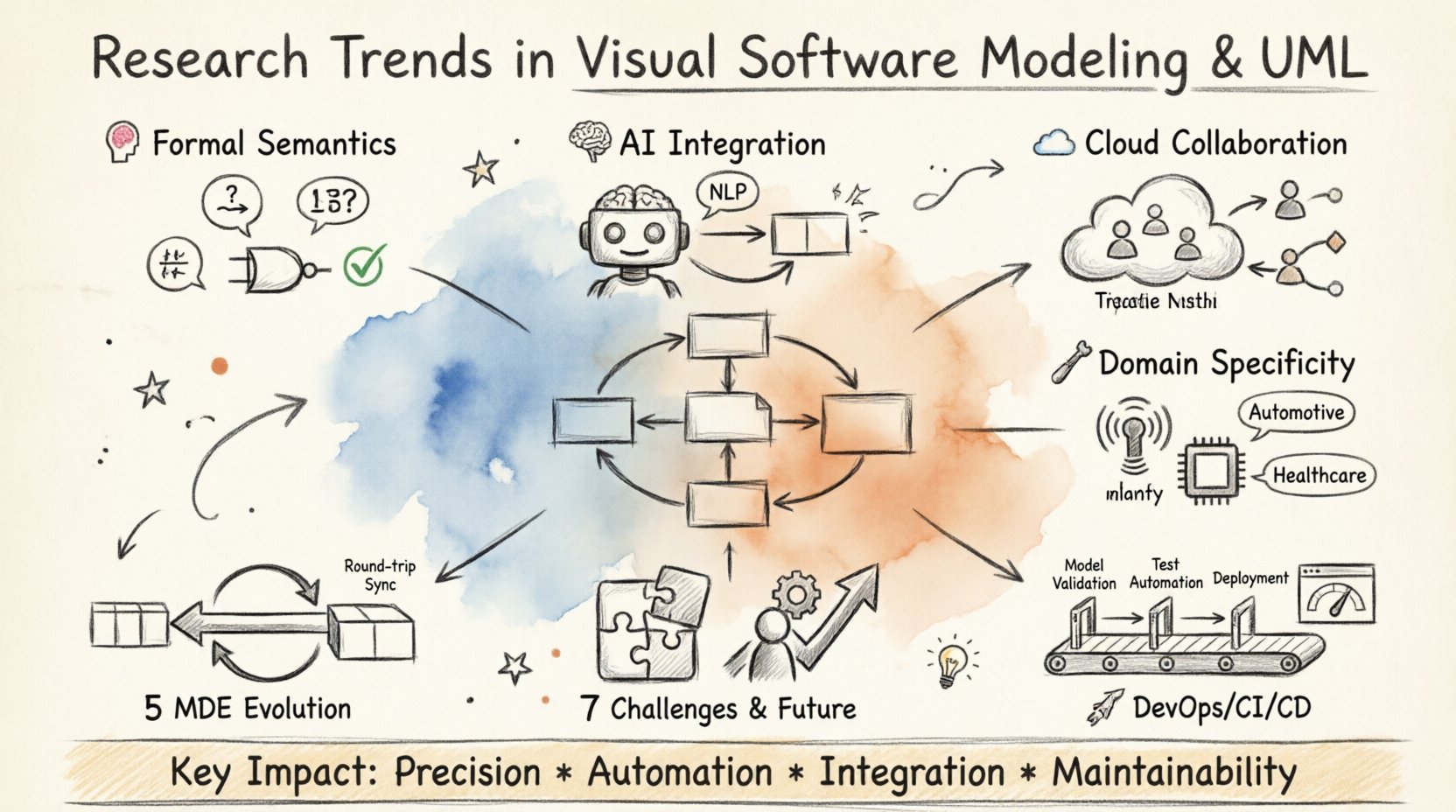
💡 Key Takeaways
-
Formal Semantics: Modern modeling increasingly relies on mathematical foundations to ensure correctness and verification.
-
AI Integration: Machine learning models are now being used to generate and validate diagrams automatically.
-
Collaboration: Cloud-based environments facilitate real-time co-design across distributed engineering teams.
-
Domain Specificity: General-purpose notations are evolving to support specialized industry domains like IoT and automotive.
The landscape of software architecture continues to shift. Visual software modeling, particularly through the Unified Modeling Language (UML), remains a cornerstone in system design. However, the tools and methodologies surrounding these diagrams are undergoing significant transformation. This comprehensive guide examines the prevailing research trends shaping how we visualize and validate complex systems today, and demonstrates how Visual Paradigm’s all-in-one platform with AI capabilities fully supports these modern approaches.
1. The Shift from Syntax to Semantics 🧠
Understanding the Evolution
For decades, the primary focus of modeling was syntactic correctness. Ensuring a class diagram adhered to the grammar rules of UML was the baseline requirement. Current research, however, prioritizes semantic precision. The goal is not just drawing a box and an arrow, but defining the exact meaning of that connection.
Researchers are exploring formal methods that overlay UML with mathematical logic. This approach allows for automated reasoning about the model itself. Instead of relying solely on human inspection to find logical flaws, tools can now verify properties such as deadlock freedom or state reachability directly from the visual representation.
This transition addresses a critical gap in traditional engineering: the disconnect between the design diagram and the executable code. By grounding visual elements in formal semantics, the fidelity between the model and the implementation improves significantly.
How Visual Paradigm Supports Formal Semantics
Visual Paradigm bridges the gap between visual modeling and formal verification through several key capabilities:
Standards-Compliant Modeling: Visual Paradigm provides certified support for industry-standard modeling languages including UML 2.5, SysML, and ArchiMate 3, ensuring that models adhere to formally defined semantics [[3]].
Model Validation and Analysis: The platform’s AI-powered analysis tools can intelligently analyze diagrams to identify design inconsistencies, validate relationships, and suggest improvements based on established best practices [[5]].
Automated Consistency Checking: Through features like the Use Case Diagram Refinement Tool and Sequence Diagram Refinement Tool, Visual Paradigm ensures that models maintain logical consistency and follow proper semantic relationships, including complex patterns like <<extend>> and <<include>> dependencies [[6]].
State Machine Verification: Visual Paradigm supports state machine diagrams with code generation capabilities, allowing teams to verify state transitions and ensure deadlock-free designs before implementation [[22]].
2. Model-Driven Engineering (MDE) Evolution 🔄
The Maturation of MDE
Model-Driven Engineering has matured from a theoretical concept into a practical workflow for many organizations. The core premise remains: models are not just documentation; they are artifacts that drive code generation. Recent advancements focus on bidirectional transformation.
Traditionally, code generation flowed from model to code. If the code changed, the model often became stale. New research emphasizes round-trip engineering, where changes in the implementation are propagated back to the model. This synchronization ensures the visual representation remains a source of truth throughout the software lifecycle.
The complexity of modern systems requires more than simple boilerplate generation. Research now targets domain-specific code generation that adapts to the architectural style of the project. This allows teams to maintain high-level abstractions while still producing optimized, production-ready artifacts.
Visual Paradigm’s Comprehensive MDE Support
Visual Paradigm excels in model-driven engineering with robust bidirectional transformation capabilities:
Round-Trip Engineering: Visual Paradigm offers sophisticated round-trip engineering for multiple programming languages including Java, C++, C#, Python, PHP, and more [[21]]. The platform ensures that:
-
Generate source code from UML class models
-
Reflect code changes back to the UML model automatically
-
Merge changes seamlessly during every synchronization
-
Maintain design-code consistency throughout development [[20]]
Multi-Language Code Generation: The Instant Generator feature supports forward and reverse engineering for an extensive list of languages:
-
Java, C#, C++, Python, PHP
-
Ruby, VB.NET, .NET dll/exe
-
ActionScript, IDL, Delphi, Perl
-
XML, XML Schema, Objective-C 2.0, Ada95
-
Hibernate ORM mappings [[21]]
IDE Integration: Visual Paradigm integrates seamlessly with popular development environments including Eclipse, NetBeans, IntelliJ IDEA, Visual Studio, and Android Studio, allowing developers to perform model-driven engineering without leaving their coding environment [[21]].
Database Engineering: The platform extends MDE principles to database design through DB Generation & Reversal capabilities, enabling teams to generate database schemas from models and reverse-engineer existing databases into visual models [[21]].
3. Artificial Intelligence and Automated Modeling 🤖
The AI Revolution in Modeling
The integration of Artificial Intelligence into modeling tools is perhaps the most visible trend. Natural Language Processing (NLP) allows engineers to describe system requirements in text, which are then converted into diagrams. This lowers the barrier to entry for complex modeling tasks.
Beyond generation, AI is being applied to model improvement. Algorithms analyze existing diagrams to suggest optimizations, identify redundancies, or detect design patterns that were missed. This acts as an intelligent review mechanism, providing feedback that complements human expertise.
Furthermore, predictive analytics are being used to assess the quality of a design before implementation begins. By training models on historical project data, systems can predict potential maintenance costs or failure points based on the structure of the diagram alone.
Visual Paradigm’s AI-Powered Platform
Visual Paradigm has embraced AI integration comprehensively, offering an extensive suite of AI-powered tools that transform the modeling experience:
AI Chatbot for Instant Diagram Generation
Visual Paradigm’s AI Chatbot represents a paradigm shift in how diagrams are created [[5]]:
Conversational Diagram Creation:
-
Describe your system in natural language: “Create a use case diagram for an online shopping system”
-
The AI instantly understands intent and generates complete, presentation-ready diagrams
-
Supports UML, SysML, C4, ArchiMate, Mind Maps, and business strategy frameworks
-
No templates or manual drawing required [[5]]
Intelligent Refinement:
-
Refine diagrams through natural commands: “Add payment gateway” or “Rename Customer to Buyer”
-
The AI updates diagrams immediately based on conversational input
-
Add, remove, or rename elements without manual editing
-
Refactor entire diagrams with simple text commands [[5]]
Smart Analysis & Documentation:
-
Ask questions like “What are the main use cases?” in plain English
-
Receive intelligent suggestions for design improvements and best practices
-
Generate detailed reports, summaries, and professional documentation on demand
-
Export work or continue refining in the desktop app [[5]]
AI-Powered Use Case Modeling Studio
The Use Case Modeling Studio demonstrates Visual Paradigm’s commitment to AI-driven automation [[6]]:
Automated Use Case Generation:
-
Input a simple goal statement
-
AI generates multi-section use case specifications automatically
-
Includes pre-conditions, post-conditions, and step-by-step flows
-
Skips tedious documentation phases and delivers finished drafts instantly [[6]]
Multi-Diagram Generation:
-
Transform text into Activity Diagrams, Sequence Diagrams, Class Diagrams, and ERDs with one click
-
AI handles logic and layout automatically
-
Focus on architecture while the AI manages technical details
-
Ensures error-free logic by following software design rules [[6]]
Automated Test Planning:
-
AI analyzes use cases and automatically generates test cases
-
Identifies what to check and expected results
-
Enables QA teams to start testing early in the development cycle
-
Bridges requirements and testing seamlessly [[6]]
MVC to Database Modeling:
-
AI identifies Model-View-Controller components from descriptions
-
Builds Entity Relationship Diagrams (ERDs) automatically
-
Keeps requirements and database design in sync
-
Connects high-level architecture to data models [[6]]
Comprehensive AI Tool Ecosystem
Visual Paradigm offers an extensive collection of AI-powered tools across multiple domains [[8]]:
Software Development AI Tools:
-
DBModeler AI for database design
-
AI-Powered C4 PlantUML Studio
-
AI-Assisted UML Class Diagram Generator
-
AI MVC System Architecture Generator
-
Development Plan Generator
-
Use Case to Activity Diagram converter
-
AI Textual Analysis tools
Business & Strategic Analysis:
-
AI Cloud Architecture Studio
-
SWOT-TOWS Business Analysis
-
PESTLE Analysis Tool
-
Porter’s Five Forces Analyzer
-
Business Model Canvas Builder
-
Competitive Analysis Tool
Process & Project Management:
-
AI-Powered Value Stream Mapping Editor
-
Intelligent BPM and Analysis Suite
-
AI-Powered KPI Performance Diagram Builder
-
Agilien: AI-Powered Jira Backlog Planner
-
AI-Powered Infographic Generator
Content & Documentation:
-
AI Article Writer
-
AI Flipbook Maker
-
AI-Powered Site Builder
-
AI Image Translator
-
Markdown Presentation Maker
4. Collaborative and Cloud-Based Environments ☁️
The Shift to Distributed Modeling
Software development is increasingly distributed. Remote work and global teams necessitate a shift from local file-based modeling to collaborative cloud platforms. This allows multiple stakeholders to edit and view models simultaneously.
Research in this area focuses on conflict resolution and version control for visual data. Unlike text code, visual elements can overlap in complex ways. New algorithms manage concurrent edits to ensure that changes from different users merge correctly without losing data.
Cloud integration also facilitates better stakeholder communication. Non-technical team members can access simplified views of the system without needing specialized modeling software. This democratizes the understanding of the architecture, aligning business goals with technical execution.
Visual Paradigm’s Cloud Collaboration Platform
Visual Paradigm provides enterprise-grade collaboration capabilities through VP Online and cloud-based Teamwork Server:
Cloud-Based Team Repository
Visual Paradigm offers a comprehensive cloud collaboration solution [[10]]:
Zero-Setup Collaboration:
-
Cloud-based repository where members and projects are organized centrally
-
No hosting or installation required
-
1 GB FREE cloud storage (upgradeable)
-
Access your work anytime, anywhere, from any device
-
Automatic in-tool notifications for changes made by team members [[10]]
Advanced Version Control:
-
Sophisticated merging of changes upon commit and update (not simple overwrite)
-
Work offline without constant repository connection
-
Changes sync automatically when reconnected
-
Branching and tagging for parallel development
-
Roll back undesired changes easily
-
Compare revisions to identify specific modifications [[10]][[16]]
Security & Access Control:
-
Sophisticated permission settings
-
Active Directory / LDAP authentication
-
SAML authentication through Okta or Microsoft Azure
-
Diagram locking to prevent undesired changes
-
Secure, enterprise-grade data protection [[10]]
Real-Time Collaborative Editing
Visual Paradigm enables true team collaboration [[11]]:
Concurrent Design:
-
Multiple team members can work on the same project simultaneously
-
Changes merge intelligently without data loss
-
Team members simply open projects from the repository, work in Visual Paradigm, and commit changes back
-
Automatic notifications keep everyone informed of updates [[10]]
Integrated Communication:
-
Built-in communication tools allow team members to discuss design ideas directly on diagrams
-
Posts and replies attach to specific shapes or elements
-
Eliminate ambiguity about discussion context
-
Discussion history traces the reasoning behind design decisions
-
Comment and review features for stakeholder feedback [[11]]
Stakeholder Engagement
Visual Paradigm bridges the gap between technical teams and business stakeholders [[11]]:
Web-Based Diagram Viewing:
-
Stakeholders can view diagrams through standard web browsers
-
No specialized software required for reviewers
-
Share designs with clients, managers, and non-technical team members
-
Enable design approval workflows remotely
Interactive Feedback:
-
Stakeholders can post questions and comments directly on diagrams
-
Team members read and reply to comments within Visual Paradigm
-
Context-specific discussions tied to diagram elements
-
Clear audit trail of feedback and resolutions
Change Request Management:
-
Clients can submit change requests through independent branches
-
Approvers review changes online
-
Provide feedback via PostMania interface
-
Seamless collaboration and integration of design modifications
-
Formal approval workflows [[11]]
Seamless Desktop-Cloud Integration
Visual Paradigm unifies desktop and cloud experiences [[5]]:
Unified Workspace:
-
AI Chatbot and cloud features accessible directly from desktop application
-
Work synchronized across web and desktop automatically
-
Single Visual Paradigm account manages all work
-
No manual file transfers needed
-
Import AI-generated diagrams directly into desktop projects (Professional Edition and above) [[5]]
5. Domain-Specific Languages and Hybrid Approaches 🛠️
The Rise of Specialized Modeling
General-purpose modeling languages face limitations when applied to highly specialized domains. A diagram that works well for web applications may not capture the nuances of safety-critical automotive systems or IoT networks.
Consequently, there is a strong trend toward Domain-Specific Modeling (DSM). Researchers are developing notations tailored to specific industries. These DSLs inherit the visual clarity of UML but include concepts and constraints relevant to their field.
Hybrid approaches are also gaining traction. These frameworks allow a general-purpose model to be extended with domain-specific annotations. This provides flexibility, enabling teams to use standard notations while embedding specialized metadata where necessary.
Visual Paradigm’s Multi-Domain Support
Visual Paradigm excels in supporting diverse modeling domains through comprehensive language support and specialized tools:
Enterprise Architecture
Visual Paradigm provides certified support for enterprise architecture frameworks [[3]]:
-
ArchiMate® 3 (Officially Certified)
-
DoDAF (Department of Defense Architecture Framework)
-
NAF (NATO Architecture Framework)
-
MODAF (Ministry of Defence Architecture Framework)
-
TOGAF® ADM Guide-Through and Process-Map
Software & Systems Engineering
Comprehensive support for software and systems modeling [[3]]:
-
UML 2.5 (Unified Modeling Language)
-
SysML (Systems Modeling Language)
-
C4 Model (Context, Containers, Components, Code)
-
ER Diagrams (Entity Relationship Modeling)
-
DFD (Data Flow Diagrams)
-
Wireframes & Mockups for UX design
Business Process Modeling
Extensive business modeling capabilities [[3]]:
-
BPMN 2.0 (Business Process Model and Notation)
-
CMMN (Case Management Model and Notation)
-
Decision Tables for business rules
-
Organization Charts
-
Value Stream Mapping
-
Customer Journey Maps
Agile & Project Management
Full support for agile methodologies [[3]]:
-
User Story Mapping
-
Scrum Process Canvas
-
LeSS (Large-Scale Scrum) Canvas
-
Nexus Canvas
-
PMBOK® Process Maps
-
Gantt Charts
-
User Story (3Cs) Editor
Strategic Analysis & Planning
AI-powered strategic tools [[8]]:
-
Business Model Canvas Builder
-
Balanced Scorecard Framework
-
SWOT-TOWS Analysis
-
PESTLE Analysis
-
Porter’s Five Forces
-
Value Chain Analysis
-
BCG Matrix
-
Ansoff Matrix
-
OKRs Framework
-
Hoshin Kanri Tool
-
Blue Ocean Strategy
DevOps & Cloud Architecture
Modern infrastructure modeling [[33]]:
-
PlantUML Deployment Diagram Builder for CI/CD pipelines
-
AI Cloud Architecture Studio
-
Visual REST API Designer
-
AWS Architecture Diagrams
-
Container orchestration visualization
Hybrid Modeling Approaches
Visual Paradigm supports hybrid modeling through:
-
Extensible metamodels that allow custom stereotypes and profiles
-
Model transformation between different notation types
-
Cross-diagram references linking elements across different views
-
Custom properties for domain-specific metadata
-
Integration capabilities with external tools and data sources
6. Integration with DevOps and CI/CD 🚀
Bridging Design and Deployment
The separation between design and deployment is narrowing. In modern pipelines, models are not static artifacts created at the start of a project. They are integrated into Continuous Integration and Continuous Deployment (CI/CD) workflows.
Automated testing of models is becoming standard practice. Before code is merged, the model undergoes validation checks. If the model violates defined constraints, the pipeline halts. This shifts quality assurance earlier in the process, reducing the cost of fixing defects.
Visualization tools are also being embedded into dashboards. Engineers can see the impact of a deployment on the system architecture in real-time. This feedback loop helps teams understand the consequences of changes as they happen, rather than weeks later.
Visual Paradigm’s DevOps Integration
Visual Paradigm provides comprehensive support for DevOps practices and CI/CD integration:
Deployment & Infrastructure Modeling
PlantUML Deployment Diagram Builder: Visual Paradigm offers specialized tools for DevOps teams [[33]]:
-
Model, preview, and export deployment diagrams rapidly
-
Visualize CI/CD pipelines, container orchestration, and monitoring infrastructure
-
Fast, wizard-driven workflow for infrastructure architecture
-
Support for AWS, Azure, and cloud-native architectures
-
Integration with PlantUML for text-based diagram versioning [[33]]
CI/CD Pipeline Visualization:
-
Pre-built templates for CI/CD pipeline diagrams
-
Support for Microsoft Windows, Linux, and cross-platform deployments
-
Visual representation of build, test, and deployment stages
-
Infrastructure-as-code documentation
-
Container and microservices architecture diagrams [[35]][[38]]
Code Engineering for DevOps
Visual Paradigm supports DevOps through robust code engineering capabilities [[21]]:
-
Automated Code Generation from models integrates with build pipelines
-
Reverse Engineering keeps models synchronized with evolving codebases
-
Round-Trip Engineering ensures design documentation stays current
-
Database Generation & Reversal for schema migrations
-
Hibernate ORM support for automated persistence layer generation
IDE Integration for Continuous Development
Seamless integration with development environments supports DevOps workflows [[21]]:
-
Eclipse, NetBeans, IntelliJ IDEA integration
-
Visual Studio integration for .NET DevOps pipelines
-
Android Studio support for mobile DevOps
-
Update code from UML or update UML from code with one click
-
No context switching between design and development
Model Validation in CI/CD
Visual Paradigm enables model quality gates:
-
Automated model validation checks before code generation
-
Constraint checking ensures models meet architectural standards
-
Consistency verification across multiple diagrams
-
AI-powered analysis identifies potential design issues
-
Report generation for audit trails and compliance
REST API & Microservices Design
Modern architecture support for DevOps [[3]]:
-
Visual REST API Designer for API-first development
-
OpenAPI/Swagger integration
-
Microservices architecture modeling
-
Service discovery and orchestration diagrams
-
API documentation generation
7. Challenges and Future Directions 🌐
Navigating Complexity
Despite these advancements, challenges remain. The complexity of models can grow exponentially as systems scale. Managing this complexity without overwhelming the user is a key research focus. Techniques such as abstraction, curation, and dynamic view generation are being refined to handle large-scale architectures.
Interoperability between different modeling tools is another hurdle. Data exchange standards are improving, but seamless integration across the toolchain is still a work in progress. Research continues to standardize metadata exchange formats to ensure portability.
The human factor remains central. Technology cannot replace the intuition and creativity of the architect. The goal of these trends is to augment human capability, not replace it. Tools that reduce cognitive load and highlight critical risks are the most valuable assets in this evolving landscape.
How Visual Paradigm Addresses Modern Challenges
Visual Paradigm tackles these challenges through innovative features and thoughtful design:
Managing Complexity
Abstraction & View Management:
-
Overview diagrams provide high-level system views
-
Layer-based modeling organizes complex systems
-
Dynamic view generation creates focused perspectives
-
Model decomposition breaks large systems into manageable modules
-
Navigation aids help users traverse complex models
AI-Powered Simplification:
-
Intelligent analysis highlights critical elements
-
Automated refactoring suggestions reduce complexity
-
Pattern detection identifies redundancies
-
Smart search finds elements across large models
-
Contextual filtering shows relevant information
Interoperability & Standards
Visual Paradigm ensures broad compatibility [[3]]:
-
XMI export/import for model portability
-
PlantUML integration for text-based versioning
-
SVG, PNG, PDF export for universal viewing
-
REST API for toolchain integration
-
Database connectivity for data exchange
-
Version control system integration (Git, SVN)
Reducing Cognitive Load
Intelligent Assistance:
-
AI Chatbot handles routine diagram creation
-
Smart templates accelerate common tasks
-
Contextual help provides guidance when needed
-
Automated documentation reduces manual effort
-
Visual clarity through professional diagram layouts
Collaborative Intelligence:
-
Team knowledge sharing through shared repositories
-
Design pattern libraries for reuse
-
Best practice enforcement through validation rules
-
Stakeholder communication tools bridge technical gaps
-
Training resources and guided tutorials
8. Summary of Impact 📈
The Transformation of Visual Modeling
The evolution of visual software modeling is moving towards greater precision, automation, and integration. By embracing formal semantics, leveraging AI, and adopting collaborative cloud environments, the industry is building systems that are more robust and easier to maintain. These trends reflect a maturity in how we approach software architecture, treating it as a dynamic, living artifact rather than a static document.
Visual Paradigm: Your Complete Solution
Visual Paradigm stands at the forefront of this transformation, offering a comprehensive, AI-powered platform that addresses every major research trend:
✅ Formal Semantics: Standards-compliant modeling with UML, SysML, and ArchiMate certification, supported by AI-powered validation
✅ AI Integration: Extensive AI toolset including Chatbot, Use Case Modeling Studio, and dozens of specialized AI assistants for automated diagram generation and analysis
✅ Model-Driven Engineering: Sophisticated round-trip engineering for 15+ programming languages with seamless IDE integration
✅ Cloud Collaboration: Enterprise-grade team collaboration with version control, real-time editing, and stakeholder engagement tools
✅ Domain Specificity: Support for 50+ modeling languages and frameworks spanning enterprise architecture, software engineering, business analysis, agile development, and strategic planning
✅ DevOps Integration: CI/CD pipeline visualization, deployment modeling, REST API design, and automated code generation
✅ Scalability: Tools and techniques to manage complexity in large-scale enterprise systems
Visual Paradigm’s all-in-one platform doesn’t just support these trends—it embodies them. By combining traditional modeling rigor with cutting-edge AI capabilities, cloud collaboration, and comprehensive language support, Visual Paradigm empowers teams to build better systems faster, with greater clarity and confidence.
References
- Research Trends in Visual Software Modeling and UML Infographic: Visual summary of key research trends including formal semantics, AI integration, cloud collaboration, domain-specific languages, bidirectional MDE, and DevOps integration in visual software modeling.
- Visual Paradigm AI Chatbot: AI-powered conversational interface for instant diagram generation, intelligent refinement, and automated documentation across UML, SysML, C4, and business modeling frameworks.
- AI-Powered Use Case Modeling Studio: Automated use case specification generator that transforms text descriptions into complete UML diagrams, test cases, and software design documents.
- Visual Paradigm Team Collaboration Tools: Cloud-based repository with version control, real-time collaboration, stakeholder engagement, and change request management for distributed teams.
- Visual Paradigm Code Engineering Tools: Comprehensive round-trip engineering supporting 15+ programming languages with IDE integration for seamless model-driven development.
- Visual Paradigm Complete Feature Set: All-in-one visual modeling platform offering UML, BPMN, ERD, ArchiMate, wireframing, agile tools, and AI-powered diagram generation.
- PlantUML Deployment Diagram Builder: Specialized tool for DevOps teams to model CI/CD pipelines, container orchestration, and cloud infrastructure with PlantUML integration.
- Visual Paradigm AI Tools Directory: Comprehensive collection of AI-powered tools for strategic analysis, software development, business modeling, agile workflows, and project management.
- Visual Paradigm User Guide – Advanced Modeling: Documentation covering advanced modeling techniques including mouse gestures, layers, and overview diagrams for managing complex systems.
- Visual Paradigm Teamwork Server: Introduction to cloud-based team collaboration with VP Online, featuring online repository, concurrent work, and global access capabilities.
Related posts:
 Comprehensive Guide to AI-Powered Database Modeling with Visual Paradigm: From Requirements to Production-Ready Schema
Comprehensive Guide to Visual Paradigm’s AI-Powered, All-in-One Platform for Software Development
Comprehensive Guide to Visual Paradigm’s AI-Powered, All-in-One Platform for Software Development
Comprehensive Guide to AI-Powered Database Modeling with Visual Paradigm: From Requirements to Production-Ready Schema
Comprehensive Guide to Visual Paradigm’s AI-Powered, All-in-One Platform for Software Development
Comprehensive Guide to Visual Paradigm’s AI-Powered, All-in-One Platform for Software Development
 UML Guide: Security Modeling Using Unified Modeling Language