


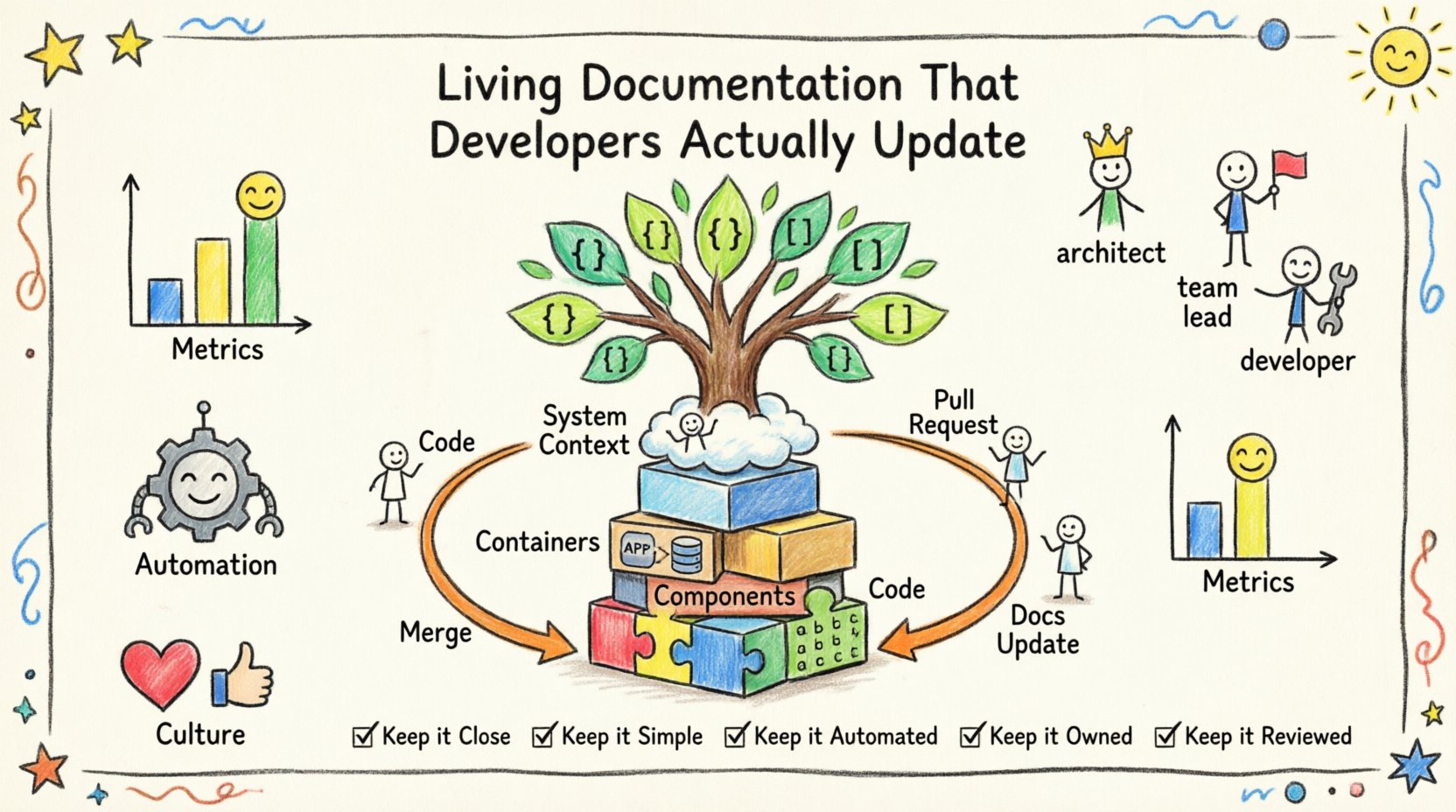
Documentation often sits in the digital wilderness, forgotten and outdated. Developers know this reality well. They encounter stale diagrams and descriptions that no longer match the running code. This disconnect creates friction, slows onboarding, and increases the risk of errors during deployment. The goal is not just to write documentation, but to create a system where documentation evolves alongside the codebase. This guide explores how to build living documentation using the C4 Model, ensuring it remains relevant and valuable for the engineering team.
Why Documentation Becomes Technical Debt 📉
When documentation is treated as a separate artifact from development, it inevitably decays. The primary reason for this decay is friction. If updating a diagram requires manual intervention outside the normal coding flow, it gets deprioritized. Developers focus on features and bug fixes. Documentation sits on the backlog until it is forgotten.
Consider the lifecycle of a software change:
- A developer modifies a database schema.
- The code is pushed to the repository.
- The change is merged into the main branch.
- The diagram remains static, showing the old schema.
Within a few weeks, the system state described in the documentation is factually incorrect. This is not merely an inconvenience; it is technical debt. Future developers relying on that information will make incorrect assumptions, leading to wasted time debugging or implementing logic that conflicts with reality.
To combat this, we must shift the mindset. Documentation should not be an afterthought. It is a deliverable with the same weight as the code itself. The C4 Model provides a structured way to organize this information, but the structure alone is insufficient. The workflow surrounding the creation and maintenance of these artifacts is critical.
The C4 Model as a Structural Anchor 🏗️
The C4 Model offers a standardized hierarchy for describing software architecture. It breaks down complexity into four levels, allowing teams to zoom in and out without losing context. This hierarchy is particularly useful for living documentation because it defines exactly what needs to be updated at each stage of the software lifecycle.
Level 1: System Context
This diagram shows the system as a black box and its relationship to users and other systems. It is the highest level of abstraction. When a new external API is integrated, this diagram must change. It answers the question: Who uses this system and why?
Level 2: Containers
Containers represent deployable units of software, such as web applications, mobile apps, or databases. This level defines the technology stack and data flow between components. If a monolith is split into microservices, the container view undergoes significant change. It answers: What are the major building blocks?
Level 3: Components
Components are the functional units within a container. They represent classes, libraries, or modules. This level is often the most detailed. When a new feature is added to a specific module, this diagram requires an update. It answers: How does the system work internally?
Level 4: Code
Code is the lowest level, representing individual classes and methods. While rarely documented as diagrams, comments and signatures serve this purpose. This level is best kept synchronized with the source code itself. It answers: How does the code function?
Using this hierarchy ensures that documentation updates are scoped correctly. You do not need to redraw the entire architecture when a single component changes. You only update the relevant level, reducing the cognitive load on the team.
Integrating Documentation into Development Workflows 🔗
The most effective way to keep documentation alive is to embed the update process into the existing development pipeline. This eliminates the “extra step” mentality. If the process feels like a burden, it will be skipped.
Pull Request Integration
Every code change should trigger a documentation review. When a developer opens a pull request, the checklist should include documentation updates. This does not mean rewriting the entire book. It means updating the specific diagram or text that corresponds to the code change.
- Small Changes: If a class name changes, update the component diagram.
- Large Changes: If a new service is added, update the container diagram.
- Verification: The reviewer checks the diagram against the code to ensure accuracy.
This approach treats documentation as part of the definition of done. A feature is not complete until the system view reflects the new state.
Version Control for Diagrams
Just like code, diagrams should live in the version control system. Storing diagram files alongside source code ensures that history is tracked. If a diagram becomes incorrect, the team can revert to a previous version or see who made the change.
Using text-based formats for diagrams is highly recommended. This allows for diffing capabilities. If a diagram is an image file, changes are hard to review. If it is a text file (like a domain-specific language), the difference is visible in the code review tool. This transparency encourages accountability.
Defining Ownership and Responsibility 🤝
Who is responsible for keeping the documentation up to date? If everyone is responsible, often no one is. Clear ownership models prevent this ambiguity. There are two main approaches to ownership.
Feature-Based Ownership
The developer working on a specific feature owns the documentation for that feature. This is the most direct method. The person who understands the code best is the one who updates the description. This reduces the lag time between code changes and documentation updates.
Domain Ownership
For high-level diagrams like System Context, a designated architect or lead developer may own the view. They ensure that the high-level narrative remains consistent across different teams. This prevents fragmentation where different teams describe the same boundary differently.
A table can help clarify responsibilities based on the C4 level:
| C4 Level | Typical Owner | Update Frequency |
|---|---|---|
| System Context | System Architect | Quarterly or Major Release |
| Containers | Team Leads | Per Sprint or Milestone |
| Components | Feature Developers | Per Pull Request |
| Code | All Developers | Continuous |
This matrix ensures that the right people are involved at the right granularity. It prevents the architect from getting bogged down in component details while ensuring developers do not ignore the big picture.
Automation Without Dependency on Specific Tools ⚙️
Manual updates are prone to human error. Automation can reduce the burden, but it does not replace the need for human judgment. The goal is to automate the synchronization between code and documentation.
Code Comments as Source of Truth
One effective strategy is to treat code comments as the primary source of truth for Component and Code levels. Documentation generators can extract these comments to produce HTML or PDF reports. When the code is refactored, the comments are updated simultaneously. This ensures that the documentation is always in sync with the implementation.
Automated Checks
CI pipelines can include checks that verify the existence of documentation files. If a new microservice is added to the codebase but no corresponding container diagram entry exists, the build can fail. This forces the developer to address the gap immediately. It is a gentle nudge that prevents the documentation debt from accumulating.
Diagram Generation
For container and component levels, some teams prefer to generate diagrams from code repositories. This removes the manual drawing step entirely. The tool reads the code structure and outputs the visual representation. While this approach requires setup, it guarantees that the visual matches the code exactly. The trade-off is that the diagrams may lack the semantic context that a human hand-drawn diagram provides. A hybrid approach often works best: use code-generated diagrams for structure and manual diagrams for context.
Measuring Documentation Health 📊
How do you know if the documentation is actually living? Metrics provide the evidence. You need to track engagement and accuracy over time.
Update Frequency
Look at the commit history of the documentation files. Are they being updated regularly? A static documentation repository is a warning sign. A repository with recent commits corresponding to code releases indicates active maintenance.
Review Participation
Check the review statistics. Are documentation pull requests being reviewed? Are reviewers approving them, or are they rejecting them for inaccuracies? High rejection rates might indicate that the documentation requirements are unclear or that the team is not prioritizing accuracy.
Search and Access
Use analytics on the documentation hosting platform. Which pages are viewed most often? If the System Context page is never visited, it may be too high-level to be useful. If the Component page is accessed frequently, it indicates that developers are using it to understand the codebase.
These metrics should not be used punitively. They are diagnostic tools to identify where the process is breaking down. If the update frequency is low, perhaps the process is too difficult. If the access rate is low, perhaps the content is not finding the right audience.
Fostering a Culture Where Docs Matter 🌱
Process and tools are only half the battle. The human element is the most significant factor. Developers must feel that writing documentation is a valuable activity, not a bureaucratic chore.
Psychological Safety
Documentation updates will contain mistakes. This is natural. The culture must support correction without blame. If a developer is punished for an outdated diagram, they will stop trying to update it. Instead, treat documentation errors as opportunities for learning. When a discrepancy is found during a code review, point it out constructively.
Recognition
Publicly acknowledge good documentation. Just as code reviews celebrate clean code, documentation updates should be highlighted. When a developer creates a clear diagram that helps onboard a new team member, mention it in the team meeting. This reinforces the behavior and shows that the organization values clarity.
Onboarding Impact
Measure the impact of documentation on onboarding time. If new hires can set up their environment and understand the codebase faster because of the C4 diagrams, that is a tangible business value. Share these stories with the team. Seeing the direct benefit of documentation motivates people to contribute to it.
Addressing Common Barriers 🛑
Even with a solid plan, barriers will arise. Here are common objections and how to address them.
“I Don’t Have Time to Write”
This is the most common objection. The reality is that time spent writing documentation is time saved on debugging and answering questions. If a team spends 10 hours explaining the architecture verbally, that is 10 hours lost. One hour spent updating a diagram saves that time in the future. Frame documentation as an investment in efficiency.
“Diagramming is Hard”
Many developers struggle with visual design. Provide templates. Do not expect developers to be graphic designers. Use standard symbols and layouts. The C4 Model enforces this standardization. Keep the focus on content, not aesthetics. A messy but accurate diagram is better than a beautiful but outdated one.
“The Docs Are Too Long”
Living documentation should be concise. Long wikis are rarely read. Focus on the C4 diagrams which are visual and scannable. Supplement with short text blocks. If a document exceeds two pages, break it down. Structure the information so that a developer can find what they need in seconds.
Future-Proofing the Documentation Strategy 🔮
Technology evolves, and so should the documentation strategy. As teams grow, the C4 model needs to scale. A single system might split into multiple domains. The documentation structure must reflect this evolution.
Consider the following strategies for long-term viability:
- Versioned Documentation: Ensure that the documentation matches the version of the software running in production. This allows teams to reference the correct architecture when debugging legacy issues.
- Centralized Knowledge Base: Avoid siloed documentation. Keep all architectural views in one accessible location. This reduces the cognitive load of searching multiple platforms.
- Regular Audits: Schedule a quarterly review of the documentation. This is not a full rewrite, but a health check. Are the diagrams still accurate? Do the links work? Is the content still relevant?
By treating documentation as a living system, the team creates a knowledge asset that grows in value over time. It becomes a reference point for decision-making and a guide for new contributors.
Summary of Best Practices ✅
To ensure the documentation remains a living resource, adhere to these core principles:
- Keep it Close: Store diagrams in the same repository as the code.
- Keep it Simple: Use the C4 Model to limit scope and complexity.
- Keep it Automated: Integrate checks into the CI/CD pipeline.
- Keep it Owned: Assign clear ownership for each diagram level.
- Keep it Reviewed: Treat documentation changes as code changes.
Building a system where documentation is updated naturally requires discipline and structure. It is not about perfection; it is about relevance. When developers can trust the documentation to be accurate, they will use it. When they use it, the system becomes more maintainable. This creates a positive feedback loop where better documentation leads to better software.
The path to living documentation is continuous. It requires constant attention and a commitment to transparency. By following the C4 Model and embedding updates into the workflow, teams can eliminate the rot that plagues most architectural records. The result is a system that is easier to understand, easier to change, and easier to scale.
Related posts:
 Understanding the Four Levels of the C4 Model for System Design
 C4 Model Guide: Defining System Context Boundaries for Complex Software Solutions
 C4 Model Guide: Differentiating Containers and Components in Modern Architecture
 C4 Model Guide: Establishing a Standard Vocabulary for Software Architecture Diagrams