


Software architecture documentation often suffers from a specific disease: drift. The code evolves rapidly through commits, pull requests, and refactoring, while the diagrams representing that architecture frequently remain static. When the visual representation no longer matches the reality of the source code, trust in the documentation evaporates. This guide explores actionable strategies to maintain synchronization between C4 model diagrams and the underlying codebase without relying on specific commercial tools.
The C4 model provides a structured approach to visualizing software architecture at multiple levels of abstraction. It includes the Context, Container, Component, and Code levels. While the model itself is language-agnostic, the maintenance of diagrams describing these levels presents a significant challenge. The goal is not perfection at every second, but consistency that remains high enough to be useful for onboarding, debugging, and planning.
Understanding the Roots of Documentation Drift 📉
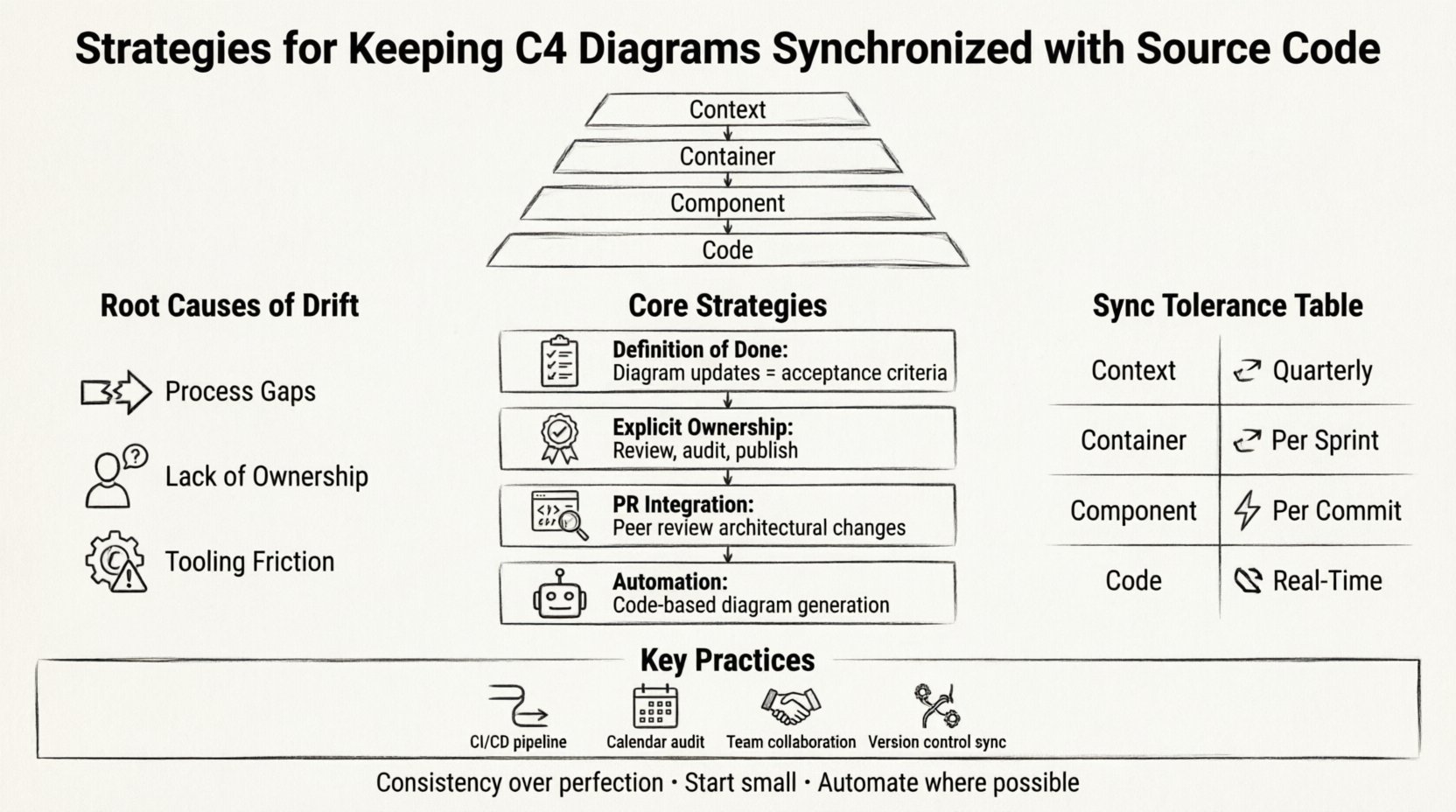
Before implementing fixes, it is necessary to understand why diagrams fall out of sync. Documentation drift typically stems from three primary causes:
- Process Gaps: There is no defined step in the development workflow that requires updating diagrams alongside code changes.
- Lack of Ownership: No specific individual or role is responsible for keeping the visual artifacts current.
- Tooling Friction: The effort required to update a diagram is perceived as higher than the effort to write the code itself.
When developers treat diagrams as an afterthought, they become outdated immediately after the first major feature release. This creates a cycle where the diagrams are ignored, leading to further neglect. To reverse this, synchronization must be treated as a non-negotiable part of the delivery pipeline.
Process-First Strategies for Synchronization 🛠️
Automation is powerful, but it cannot replace process. Establishing clear workflows ensures that diagrams are updated consistently, even if the updates are manual.
1. Define the Definition of Done
In any agile environment, a user story or task is not complete until all acceptance criteria are met. Architectural documentation should be included in this list. When a change impacts the system architecture, the diagram update becomes a mandatory acceptance criterion.
- Does the change introduce a new container?
- Does the change alter the relationships between existing components?
- Does the change affect the data flow between systems?
If the answer to any of these is yes, the relevant C4 diagram must be updated before the code is merged.
2. Assign Explicit Ownership
Documentation often falls through the cracks because everyone assumes someone else is handling it. Assign specific ownership for architectural artifacts. This does not necessarily mean a dedicated architect; it can be a rotating responsibility among senior engineers or a specific domain owner.
The owner is responsible for:
- Reviewing pending diagram changes in pull requests.
- Scheduling periodic audits of the documentation.
- Ensuring the diagrams are published to the accessible documentation portal.
3. Integrate Diagram Reviews into Pull Requests
Just as code is reviewed for logic and style, diagrams should be reviewed for accuracy and clarity. Require that any commit touching architectural files be reviewed by a peer familiar with the system design. This peer review acts as a quality gate, ensuring that the visual representation accurately reflects the code changes.
Automation and Code Generation Strategies 🤖
Manual updates are prone to human error and fatigue. Wherever possible, automate the generation of diagrams from the source code. This approach minimizes the maintenance burden by treating the diagram as a generated artifact rather than a manually edited document.
1. Code-Based Diagram Generation
Instead of drawing boxes and arrows in a graphical editor, define the architecture using code. This allows the build system to parse the source code and regenerate the diagrams automatically.
- Static Analysis: Tools can parse the code structure to identify classes, interfaces, and methods.
- Dependency Mapping: The system can trace imports and method calls to establish relationships between components.
- Tagging: Developers can use specific tags or annotations in the code to denote C4 levels, containers, or components.
This method ensures that the diagram always matches the code at the moment of generation. If the code changes, the generated diagram changes.
2. Hybrid Approaches
Full automation is not always feasible. High-level Context diagrams often describe business boundaries or external systems that are not visible in the code. A hybrid approach combines generated low-level diagrams with manually maintained high-level diagrams.
- Use code generation for Container and Component levels.
- Manually maintain the Context level to reflect business strategy and external integrations.
This reduces the manual workload significantly while preserving the necessary strategic context.
Integration into CI/CD Pipelines ⚙️
Continuous Integration and Continuous Deployment pipelines are the heartbeat of modern software development. Integrating diagram validation into these pipelines ensures that documentation drift is caught before it reaches the main branch.
1. Automated Validation Checks
Configure the pipeline to run a validation step that compares the current diagram state against the codebase. If the validation fails, the build can be flagged or blocked.
- Drift Detection: The system checks if the diagram file has changed significantly compared to the last commit.
- Syntax Validation: Ensure the diagram syntax is valid and renders correctly.
- Completeness Checks: Verify that all defined containers or components exist in the code.
2. Build Artifacts
Generate the diagrams as part of the build process. Store the generated artifacts in the build output directory. This ensures that the documentation delivered to production matches the code deployed to production. It also allows for versioning of the documentation alongside the software release.
3. Notification Systems
If the synchronization process detects a discrepancy, alert the team. This can be done via chat channels, email, or ticketing systems. The alert should specify which part of the architecture is out of sync and who is responsible for the fix.
Defining Sync Tolerance Levels 🎯
Expecting 100% synchronization at all times is often impractical and costly. Different parts of the C4 model require different levels of accuracy. Establishing tolerance levels helps prioritize effort.
| C4 Level | Sync Tolerance | Maintenance Strategy |
|---|---|---|
| Context | Low (Quarterly) | Manual review by architecture leads. |
| Container | Medium (Per Sprint) | Hybrid: Manual updates with code verification. |
| Component | High (Per Commit) | Automated generation from code. |
| Code | Real-Time | Code comments and IDE plugins. |
By accepting that lower levels require higher accuracy, teams can focus their energy where it matters most. The Context diagram might not need to be updated for every minor bug fix, but the Component diagram should reflect every structural change.
Managing Legacy Systems 🏛️
Legacy systems often lack the structure required for easy automation. They may not use modern dependency injection or clear separation of concerns. Keeping diagrams synchronized in this context requires a different approach.
1. The Strangler Fig Pattern
When refactoring a legacy system, use the Strangler Fig pattern. Gradually replace parts of the legacy system with new services. As each part is replaced, update the C4 diagrams to reflect the new architecture. This incremental approach prevents a massive, risky overhaul of documentation.
2. Reverse Engineering
For systems where the code is the only source of truth, use reverse engineering tools to generate an initial baseline. While these diagrams may not be perfect, they provide a starting point. From there, manual refinement can occur over time.
3. Acceptance of Imperfection
In some legacy contexts, perfect synchronization is impossible. In these cases, document the known gaps. Explicitly state in the diagram legend that certain relationships are approximate. This manages stakeholder expectations and maintains trust.
Culture and Communication 🤝
Technical processes fail without cultural alignment. Developers must understand why synchronization matters. It is not just about compliance; it is about reducing cognitive load for the team.
1. Onboarding Efficiency
When new engineers join the team, they rely on architecture diagrams to understand the system. Outdated diagrams lead to confusion and mistakes. Emphasize that accurate diagrams speed up onboarding and reduce the time spent asking basic questions.
2. Knowledge Sharing
Diagrams serve as a common language. When the diagrams are accurate, they facilitate better discussions during design reviews. A synchronized diagram ensures everyone is looking at the same reality, reducing miscommunication.
3. Celebrating Documentation
Treat documentation updates as valuable work. Acknowledge contributions to the architecture diagrams in team meetings. Recognize that updating a diagram is a contribution to the team’s collective knowledge, not a distraction from coding.
Periodic Audits and Maintenance 🧐
Even with automation, periodic human review is necessary. Set a schedule for auditing the architecture documentation.
- Quarterly Reviews: Conduct a high-level review of the Context and Container diagrams.
- Release Audits: Check that the diagrams match the features shipped in the release.
- Refactoring Checks: After significant refactoring, verify that the component relationships remain valid.
During these audits, look for signs of complexity creep. If a diagram becomes too cluttered, it may be time to refactor the system or split the diagram into multiple views. A synchronized diagram should remain readable.
Technical Implementation Details
Implementing these strategies requires specific technical capabilities. While the specific tools vary, the underlying principles remain the same.
- Version Control: Store diagram files in the same repository as the source code. This ensures they are versioned together and change history is tracked.
- File Naming: Use consistent naming conventions that map to the codebase structure. This makes it easier to locate the relevant diagram for a specific module.
- Rendering: Ensure the diagram files can be rendered automatically in the documentation portal. Avoid formats that require manual conversion.
- Linking: Link diagrams to the code. Where possible, click a component in the diagram to navigate to the relevant code repository.
Common Pitfalls to Avoid 🚫
Several common mistakes can undermine synchronization efforts. Awareness of these pitfalls helps teams avoid them.
- Over-Engineering: Creating diagrams for every minor change creates noise. Focus on architectural changes.
- Ignoring External Systems: Context diagrams often miss third-party services. Keep a separate inventory of external dependencies.
- Stale Tooling: Using outdated diagramming formats that are not supported by modern CI/CD tools. Choose open standards.
- Centralized Bottlenecks: Having only one person update all diagrams creates a bottleneck. Distribute the responsibility.
Final Thoughts on Architecture Consistency 📝
Maintaining synchronization between C4 diagrams and source code is a continuous effort. It requires a combination of process discipline, automation, and cultural buy-in. There is no single button to press that solves the problem permanently. The goal is to reduce the gap between the code and the documentation to a manageable level.
By implementing the strategies outlined above, teams can ensure that their architecture documentation remains a reliable asset. Accurate diagrams reduce risk, improve onboarding, and clarify complex systems. The investment in synchronization pays dividends in long-term maintainability and team velocity.
Start small. Pick one level of the C4 model, perhaps the Component level, and apply code generation there. Expand the scope as the team becomes comfortable with the new workflow. Consistency is the ultimate goal, but progress is the metric that matters.
Related posts:
 Understanding the Four Levels of the C4 Model for System Design
 C4 Model Guide: Defining System Context Boundaries for Complex Software Solutions
 C4 Model Guide: Differentiating Containers and Components in Modern Architecture
 C4 Model Guide: Establishing a Standard Vocabulary for Software Architecture Diagrams