


In the fast-paced environment of modern software development, the tension between speed and structure is constant. Teams strive to deliver value quickly, yet technical debt accumulates when architectural clarity is sacrificed for velocity. This is where the C4 Model becomes a critical asset. By visualizing software architecture at multiple levels of abstraction, teams can maintain a shared understanding without bogging down the sprint cycle. This guide explores how to weave C4 diagrams into the rhythm of agile planning, ensuring that design decisions remain visible, accessible, and actionable.
🧩 Understanding the C4 Model Context
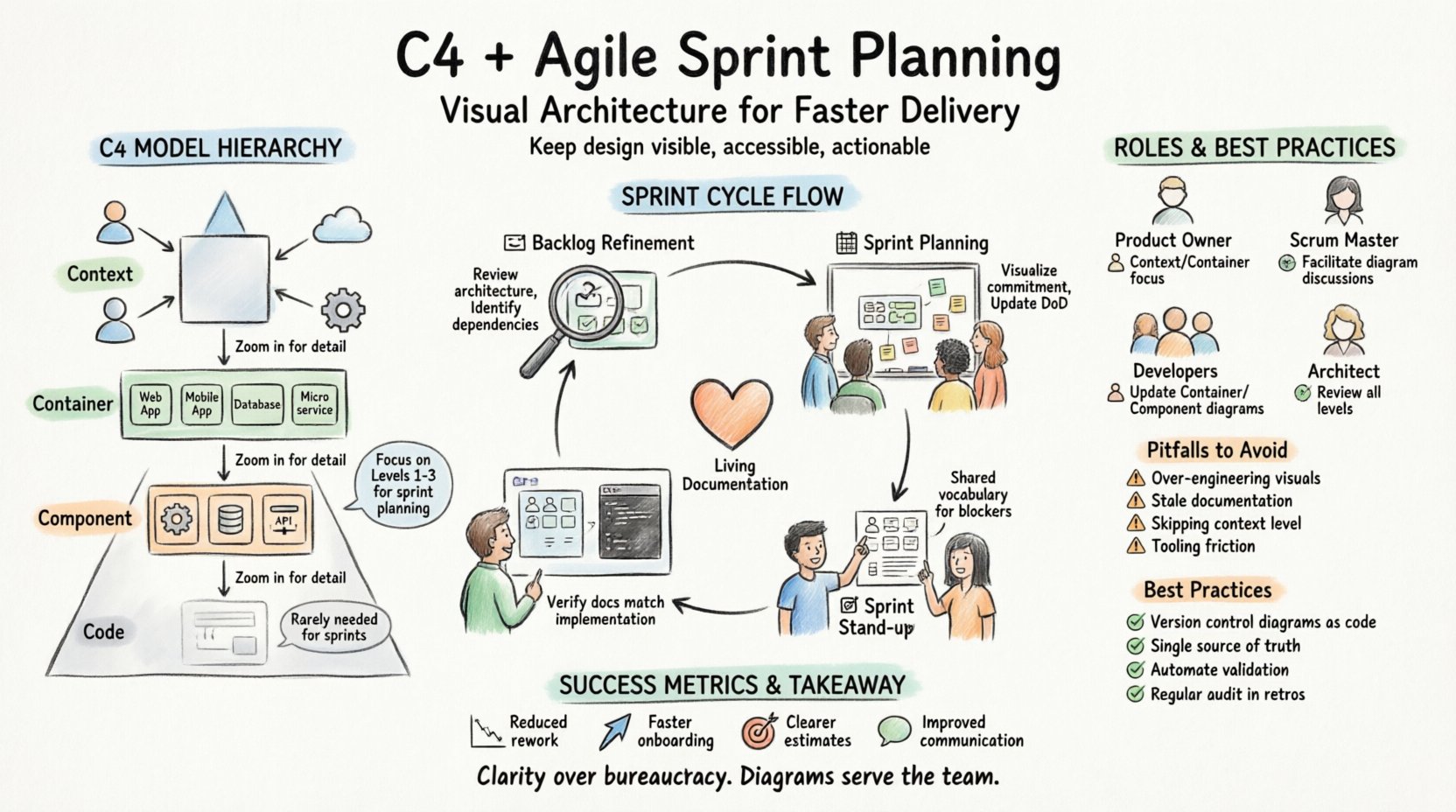
The C4 Model is a hierarchical approach to software architecture diagramming. It moves from the broadest view of the system down to the most granular details. This hierarchy prevents information overload, allowing different stakeholders to engage with the architecture at the appropriate depth. The four levels are:
- Level 1: Context Diagrams (System Context) – Shows how the software fits into the broader ecosystem. It depicts users and external systems interacting with the application.
- Level 2: Container Diagrams – Illustrates the high-level technical building blocks, such as web applications, mobile apps, databases, or microservices.
- Level 3: Component Diagrams – Breaks down containers into smaller, cohesive parts like services, modules, or classes that perform specific functions.
- Level 4: Code Diagrams – Provides a view of individual classes and their relationships. This is rarely needed for sprint planning but is useful for deep-dive technical discussions.
When applied to agile workflows, the focus typically remains on the first three levels. These levels offer enough detail to guide development without getting lost in implementation minutiae. The goal is to create a living documentation set that evolves alongside the code, rather than static artifacts that become outdated immediately after creation.
🔄 Why C4 Aligns with Agile Principles
Agile methodologies prioritize individuals and interactions over processes and tools. However, this does not mean documentation is unnecessary. It means documentation must be valuable and lightweight. C4 diagrams support this by serving as a communication bridge between developers, product owners, and stakeholders. Here is how they align with core agile values:
- Working Software over Comprehensive Documentation – C4 diagrams are minimal. They focus on what is changing or critical for the current sprint, not the entire system history.
- Customer Collaboration over Contract Negotiation – Visuals help product owners understand technical constraints. They can see how a feature request impacts the broader system before the sprint begins.
- Responding to Change over Following a Plan – Because C4 diagrams are often created in collaborative tools, they can be updated rapidly as requirements shift during a sprint.
- Individuals and Interactions over Processes and Tools – The act of drawing a diagram together fosters discussion. It forces the team to agree on boundaries and responsibilities.
Without a shared visual language, assumptions creep in. One developer might think a database change affects only one service, while another assumes it impacts the entire data layer. C4 diagrams eliminate this ambiguity by making the dependencies explicit.
📅 Integrating Diagrams into the Sprint Cycle
Successful integration requires embedding diagramming activities into existing ceremonies. It should not feel like an extra task. Instead, it should be a natural part of the refinement and planning flow. The following sections detail how to incorporate this at each stage.
1. Backlog Refinement and Grooming
Before a story enters a sprint, it must be clear. During refinement sessions, the team should review the system context and container diagrams to ensure new requirements fit the architecture. This is the time to identify architectural risks.
- Review Current State – Pull up the relevant container diagram. Does the new feature require a new service? Does it impact an existing database?
- Identify Dependencies – If a story requires an API from another team, locate that box on the context diagram. Confirm the interface is documented.
- Update Scope – If the story is large enough to warrant a new component, sketch a preliminary component diagram during the session.
This proactive approach prevents the surprise of discovering a major architectural gap during the sprint execution phase. It ensures that the acceptance criteria include architectural constraints.
2. Sprint Planning
During planning, the team commits to work. Visual aids help estimate effort more accurately. When developers can see how their work fits into the container, they can identify integration points that might require additional time.
- Visualizing the Commitment – Place the stories on a board that references the diagram. This connects the abstract task to the concrete system structure.
- Defining the Definition of Done – Include updating the diagram as a acceptance criterion for tasks that change the architecture. If the code changes but the diagram does not, the work is incomplete.
- Allocating Time for Refactoring – If a story requires significant architectural changes, the diagram helps quantify the risk. Teams can allocate buffer time in the sprint capacity.
3. Daily Stand-ups
Daily stand-ups are for synchronization, not deep design sessions. However, if a developer hits a blocker related to system structure, the diagram is the reference point. It provides a shared vocabulary. Instead of saying “the data flow is broken,” a developer can say “the connection between Container A and Container B is inconsistent with the diagram.”
4. Sprint Review
At the end of the sprint, the team demonstrates the working software. This is also the moment to verify the documentation. Did the implementation match the plan? If the architecture changed, the diagram must reflect that change immediately.
- Walkthrough – Walk through the updated diagram with the product owner. Show where the new component sits in the system.
- Feedback Loop – Ask if the visualization clarifies the new functionality. If the diagram is confusing, simplify it.
👥 Roles and Responsibilities
Who is responsible for creating and maintaining these diagrams? In a mature agile environment, this is a shared responsibility. However, specific roles drive specific aspects of the process.
| Role | Responsibility | Diagram Focus |
|---|---|---|
| Product Owner | Ensure the diagram reflects business capabilities and user flows. | Context & Container |
| Scrum Master | Facilitate discussions where diagrams are used to resolve blockers. | Any Level |
| Developers | Create and update diagrams as code changes are made. | Container & Component |
| Architect | Review diagrams for consistency and adherence to standards. | All Levels |
Note that the Architect does not need to draw every diagram. Their role is to ensure the team has the guidelines to do so. This empowers developers to take ownership of the architecture, reducing bottlenecks.
🚧 Common Pitfalls and How to Avoid Them
Even with the best intentions, teams often struggle with the adoption of architectural diagrams. Understanding common pitfalls can help you navigate these challenges.
1. Over-Engineering the Visuals
Teams sometimes spend more time making diagrams look pretty than making them useful. A diagram is a tool for thought, not a piece of art. Focus on clarity. Use standard shapes. Avoid clutter. If a diagram takes more than 15 minutes to understand, it is too complex.
2. Stale Documentation
The most dangerous diagram is the one that is wrong. If the code changes but the diagram remains static, it creates a false sense of security. To combat this, link diagram updates to the code review process. If a pull request changes a container, the diagram must be updated in the same pull request.
3. Ignoring the Context
Teams often jump straight to component diagrams without establishing the system context. This leads to isolated thinking. Developers might optimize a component without realizing it breaks a dependency with an external system. Always start with the Context Diagram to set the stage.
4. Tooling Friction
If the tool required to create a diagram is slow or difficult to use, adoption will fail. The process must be frictionless. Ideally, the diagramming tool should integrate with the collaboration space the team already uses. Automation is key. If the diagram can be generated from the code, that is often the best approach, though manual updates allow for higher-level abstraction.
🛠️ Best Practices for Maintenance
Maintaining diagrams requires discipline. Here are specific strategies to keep the documentation healthy over time.
- Version Control – Treat diagrams as code. Store them in the same repository as the application. This ensures they are versioned and reviewed together.
- Single Source of Truth – Do not maintain diagrams in multiple places. If you have a wiki and a repo, pick one. If you have two repos, pick one. Consistency is vital.
- Automated Checks – Where possible, use tools that validate diagram syntax. If the diagram is generated from code, ensure the generation process is part of the CI/CD pipeline.
- Regular Audits – During retrospectives, ask: “Are our diagrams up to date?” If the answer is no, dedicate time in the next sprint to fix them. Do not let debt accumulate in the documentation.
📊 Measuring Success
How do you know if this integration is working? You cannot measure it solely by the number of diagrams created. Look for qualitative and quantitative indicators.
- Reduced Rework – Are teams finding fewer architectural mismatches during integration testing?
- Faster Onboarding – Do new team members understand the system faster using the diagrams?
- Clearer Estimates – Is the variance between estimated and actual sprint capacity reduced?
- Improved Communication – Are discussions during refinement faster because everyone is looking at the same visual?
🌱 Adapting to Team Maturity
Different teams require different approaches. A startup might need high-level context diagrams to secure funding or align with partners. A mature enterprise team might need detailed component diagrams to manage complex microservices. The level of detail should match the team’s maturity and the system’s complexity.
For new teams, start small. Create one Context Diagram. Review it in the next refinement. Add a Container Diagram only when the system grows beyond a single application. Do not force a full C4 implementation on day one. Let the need drive the documentation.
As the team matures, introduce more detail. Encourage developers to draw component diagrams for their specific services. This deepens their understanding of the system boundaries. The goal is a team that thinks architecturally, not just a team that draws pictures.
🤝 Collaboration and Feedback
Diagrams are a communication tool. They are not meant to be siloed. Share them widely. Post them in the team channel. Pin them in the project management space. When stakeholders see the diagram, they can provide feedback before code is written.
Feedback loops are essential. If a product owner sees the diagram and says, “This dependency seems risky,” address it immediately. This prevents wasted effort. The diagram serves as a contract for the sprint. It defines the boundaries of the work.
🔗 Linking Code and Design
The strongest integration happens when code and design are linked. If a component diagram exists, the code should reflect it. If the code structure changes, the diagram must change. This tight coupling ensures that the documentation is never far behind the implementation.
Consider using tags or comments in the code that reference the diagram nodes. This creates a traceability link. When a developer searches for a specific function, they can find the corresponding diagram element. This reduces the cognitive load when navigating large codebases.
🎯 Final Thoughts on Sustainable Architecture
Integrating C4 diagrams into agile sprint planning is not about adding bureaucracy. It is about adding clarity. In a complex system, clarity is the most valuable resource. It reduces risk, improves collaboration, and speeds up delivery.
By treating diagrams as living artifacts that evolve with the sprint, teams can maintain a high level of architectural awareness without slowing down. The process requires discipline, but the payoff is a system that is easier to understand, maintain, and extend. Start with the basics, focus on communication, and let the diagrams serve the team, not the other way around.
Related posts:
 Understanding the Four Levels of the C4 Model for System Design
 C4 Model Guide: Defining System Context Boundaries for Complex Software Solutions
 C4 Model Guide: Differentiating Containers and Components in Modern Architecture
 C4 Model Guide: Establishing a Standard Vocabulary for Software Architecture Diagrams