Enterprise architecture is complex. It involves layers of strategy, business processes, applications, and technology infrastructure. When you model this complexity, a single diagram rarely satisfies everyone. Executives need high-level strategic alignment, while developers require technical detail. This is where the concept of viewpoints becomes essential. In the ArchiMate modeling language, a viewpoint defines the perspective from which a model is viewed. It filters the information to address specific concerns.
Creating stakeholder-specific viewpoints ensures that the right people see the right information at the right time. This guide explores the mechanics of designing these viewpoints effectively. We will look at the relationship between stakeholders, concerns, and the ArchiMate metamodel. The goal is to improve communication and decision-making within an organization.
Understanding the Core Concepts 🧠
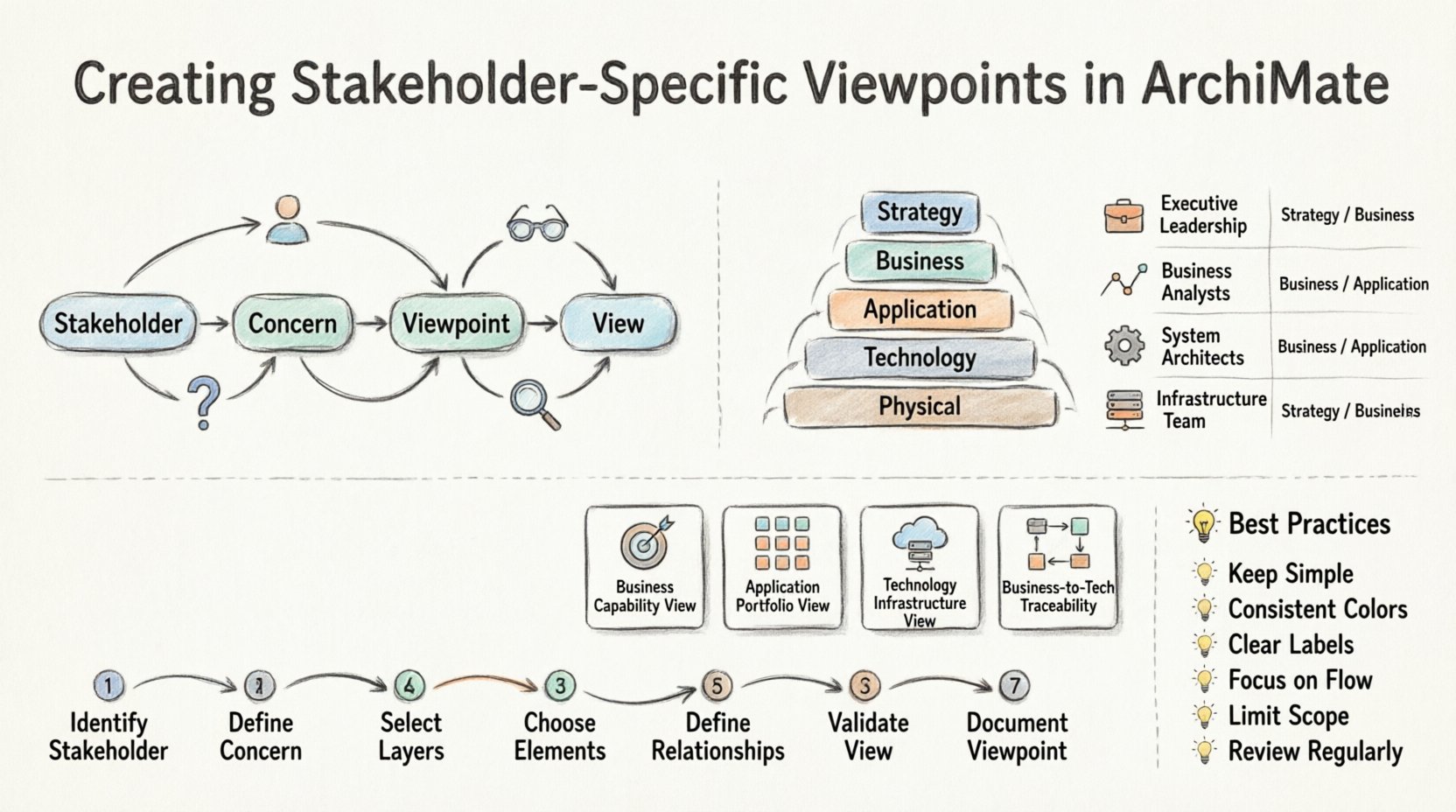
Before diving into the creation process, it is vital to understand the terminology. In ArchiMate, a View is a representation of a system for a specific purpose. A Viewpoint defines the rules for creating that view. It specifies which parts of the architecture are relevant for a specific group.
- Stakeholder: A person or group with an interest in the system. They care about specific outcomes.
- Concern: The specific issues or interests a stakeholder has. For example, a CFO cares about cost, while a CIO cares about security.
- Viewpoint: A description of how to address a concern. It dictates the notation and layers to use.
- View: The actual model created using the viewpoint rules.
Without a viewpoint, models become cluttered. They contain too much information for any single audience. By filtering the model, you reduce cognitive load. This makes the architecture actionable.
Identifying Your Stakeholders 👥
The first step in creating a viewpoint is knowing who will use it. Stakeholders vary widely in their technical knowledge and their strategic needs. Mapping these groups helps in defining the scope of each view.
Key Stakeholder Groups
- Strategic Leadership: CEOs, CFOs, and CTOs. They focus on business goals, market positioning, and investment returns.
- Business Management: Department heads and process owners. They care about operational efficiency and process flows.
- IT Management: Directors and Managers. They focus on resource allocation, project timelines, and system reliability.
- Technical Teams: Developers, System Administrators, and Data Architects. They need detailed technical specifications and interface definitions.
- External Partners: Vendors, regulators, and customers. They require compliance data or integration details.
Each group has unique concerns. A single view cannot address all of them simultaneously. Therefore, you must segment your modeling effort.
Mapping Concerns to ArchiMate Layers 📊
ArchiMate organizes architecture into layers. These layers provide a structure for filtering information. Understanding which layer addresses which concern is critical.
- Strategy Layer: Deals with goals, principles, and drivers. This is relevant for strategic leadership.
- Business Layer: Contains business processes, roles, and functions. This is relevant for business management.
- Application Layer: Describes software applications and their interactions. This is relevant for IT management and developers.
- Technology Layer: Covers hardware, networks, and infrastructure. This is relevant for technical teams.
- Physical Layer: Represents the physical hardware locations. This is relevant for facility management and infrastructure planning.
When creating a viewpoint, you decide which layers are visible. A viewpoint for a CFO might only show the Business and Strategy layers. A viewpoint for a developer might focus on the Application and Technology layers.
Stakeholder vs. Layer Mapping
| Stakeholder Group | Primary Concern | Relevant ArchiMate Layers | Key Elements to Show |
|---|---|---|---|
| Executive Leadership | Strategic Alignment | Strategy, Business | Goals, Drivers, Business Processes |
| Business Analysts | Process Efficiency | Business, Application | Functions, Roles, Application Services |
| System Architects | System Integration | Application, Technology | Applications, Interfaces, Nodes |
| Infrastructure Team | Resource Availability | Technology, Physical | Devices, Networks, Infrastructure |
This table provides a baseline. You can adjust it based on specific organizational needs. The key is consistency. Ensure that the layers selected match the stakeholder’s primary interest.
Designing the Viewpoint Rules 🛠️
A viewpoint is not just a list of layers. It defines the rules of the game. These rules determine what elements can be included, how they can be connected, and what notation is used.
Defining the Scope
Start by listing the elements that are necessary. Avoid showing everything. If a stakeholder does not care about the physical network, do not show the physical layer. Clarity comes from omission.
- Element Selection: Define which specific element types are allowed. For a high-level view, you might allow only Business Process and Application Service. For a technical view, you might include interfaces and data objects.
- Relationship Filtering: Not all relationships are relevant. A relationship between two technical devices might be noise for a business manager. Define which relationship types are permitted in the view.
- Notation Standards: Ensure consistent coloring and shapes. Use standard ArchiMate notation but consider adding custom colors to highlight specific risks or statuses.
Addressing Specific Concerns
Every viewpoint must solve a problem. It should answer a specific question. For example:
- Question: “Which applications support the customer onboarding process?”
- Viewpoint: Business Process to Application Mapping.
- Layers: Business and Application.
- Elements: Business Process, Application Function, Application Service.
If the viewpoint does not answer the question, it is not useful. Test your viewpoint by asking if a stakeholder could find the answer using it.
Common Viewpoint Patterns 🔄
There are standard patterns you can reuse. These patterns save time and ensure consistency across the organization.
1. The Business Capability View
This view maps business capabilities to organizational goals. It is ideal for strategic planning.
- Focus: What the business can do.
- Stakeholders: Executives, Strategy Teams.
- Layers: Business, Strategy.
- Key Relationships: Realization (Capability realizes Goal).
2. The Application Portfolio View
This view shows the landscape of applications. It helps in identifying redundancy and gaps.
- Focus: The software ecosystem.
- Stakeholders: CIO, Application Managers.
- Layers: Application.
- Key Relationships: Usage, Association.
3. The Technology Infrastructure View
This view details the physical and logical infrastructure.
- Focus: Hardware and connectivity.
- Stakeholders: Infrastructure Managers, Security Officers.
- Layers: Technology, Physical.
- Key Relationships: Aggregation, Association.
4. The Business to Technology Traceability View
This view connects business needs to technical implementation.
- Focus: End-to-end flow from goal to hardware.
- Stakeholders: Project Managers, Architects.
- Layers: All Layers.
- Key Relationships: Realization, Dependency.
Using these patterns provides a foundation. You can then customize them for specific projects or departments.
The Creation Process Step-by-Step 📝
Creating a viewpoint is a systematic process. Follow these steps to ensure quality and utility.
- Identify the Stakeholder: Who is the audience? Are they technical or business-focused?
- Define the Concern: What question are they trying to answer? What decision will they make?
- Select the Layers: Which parts of the architecture are relevant to the concern? Exclude the rest.
- Choose the Elements: Pick specific element types (e.g., Process, Role, Application).
- Define Relationships: Specify which connections are necessary to tell the story.
- Validate the View: Show the draft to a representative stakeholder. Ask if it makes sense.
- Document the Viewpoint: Write down the rules. This ensures others can recreate the view later.
Documentation is often skipped, but it is crucial. If you do not document the rules, the next person might create a view that looks different. Consistency builds trust.
Best Practices for Clarity and Impact 💡
To make your viewpoints effective, adhere to these best practices.
- Keep it Simple: If a view takes too long to understand, simplify it. Remove unnecessary elements.
- Use Consistent Color Coding: Define a color palette. For example, Red for risk, Green for healthy, Blue for planned. Ensure this is documented.
- Label Clearly: Use descriptive labels. Avoid generic names like “System A”. Use “Order Management System”.
- Focus on Flow: For process views, ensure the flow direction is clear. Use arrows consistently.
- Limit Scope: Do not try to show the entire enterprise in one view. Break it down by domain or capability.
- Review Regularly: Architecture changes. Viewpoints must be updated to reflect the current state.
Common Pitfalls to Avoid ⚠️
Even experienced architects make mistakes. Be aware of these common issues.
1. Too Much Detail
Showing every relationship and element confuses the audience. Stakeholders often do not need to see the physical nodes. Filter aggressively.
2. Too Little Detail
Conversely, a view that is too abstract is useless. If a developer needs to know which interface is used, do not just show “Application”. Show the interface.
3. Inconsistent Notation
If one view uses standard shapes and another uses custom icons, the audience gets confused. Standardize across all viewpoints.
4. Ignoring the Audience
Designing a view for yourself is a common error. Always ask “Who is this for?” before drawing anything. If the answer is “everyone”, the view is likely wrong.
5. Static Models
Architecture is dynamic. A viewpoint that is never updated becomes outdated. Plan for maintenance.
Iterating and Refining 🔁
The first version of a viewpoint is rarely the best. Feedback is essential. When you present a view, ask for feedback. Did they find the information they needed? Was the notation clear? Use this feedback to refine the rules.
Over time, you will build a library of standard viewpoints. This library becomes an asset. New architects can use existing templates instead of starting from scratch. This speeds up the modeling process and improves quality.
Conclusion on Stakeholder Alignment 🤝
Creating stakeholder-specific viewpoints is a foundational skill in enterprise architecture. It bridges the gap between complex technical models and business needs. By filtering information and focusing on specific concerns, you make architecture relevant. You enable better decision-making. You ensure that the investment in architecture delivers value.
Remember that a viewpoint is a contract. It promises to show only what is necessary for a specific concern. Keep this promise. Be disciplined. Be clear. And always keep the stakeholder in mind. When you do this, your architecture becomes a tool for success rather than a source of confusion.