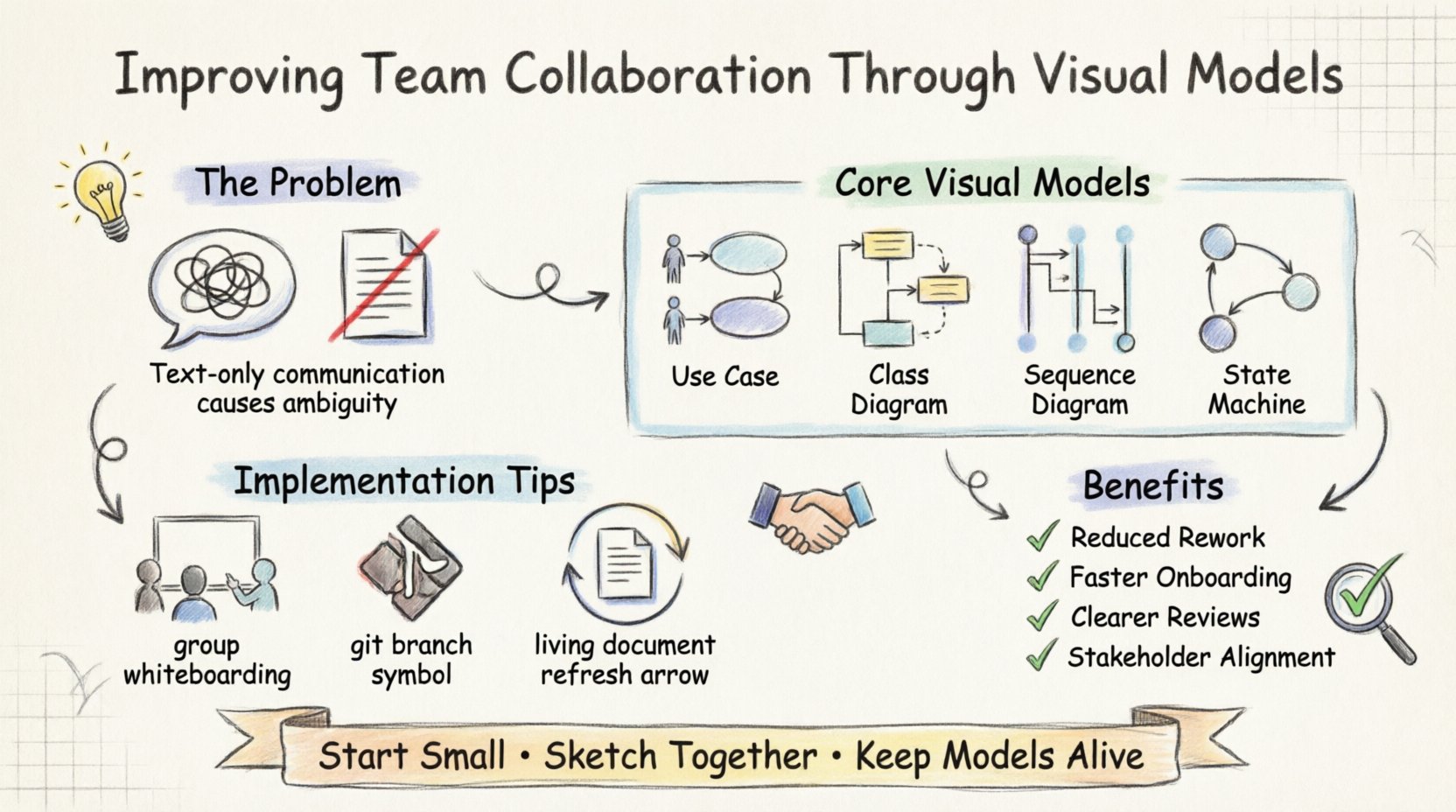
💡 Key Takeaways
- Shared Mental Models: Visual diagrams create a unified understanding across developers, designers, and stakeholders.
- Reduced Ambiguity: Text alone often leads to misinterpretation; diagrams clarify relationships and flows explicitly.
- Efficient Reviews: Visual models allow for faster identification of logic gaps before coding begins.
- Living Documentation: Models should evolve with the system to remain relevant and useful for onboarding.
Effective collaboration in software development often stalls not because of technical inability, but due to communication barriers. When requirements are described solely through text, nuances are frequently lost. Different roles interpret the same text differently, leading to rework and friction. Visual models offer a solution by translating abstract logic into a structured, shared language. This article explores how implementing visual modeling practices can bridge gaps between technical and non-technical team members.
The Challenge of Text-Only Communication 📝
Text is linear, but software architecture is rarely linear. A paragraph describing a login process might miss edge cases that a diagram reveals instantly. When a product manager describes a feature, they focus on the “what.” When an engineer describes it, they focus on the “how.” Without a visual intermediary, these perspectives often collide during implementation.
Consider the ambiguity in a sentence like, “The system should handle user data securely.” Does this mean encryption at rest? TLS in transit? Role-based access control? Visual models force the author to define boundaries, data flows, and interaction points explicitly. This precision reduces the cognitive load on the reader, allowing them to understand the system’s constraints without guessing.
Core Visual Models for Collaboration 🎨
Not all diagrams serve the same purpose. Selecting the right model depends on the question being asked. Below is a breakdown of the most effective types for cross-functional alignment.
1. Use Case Diagrams 👤
These are excellent for aligning stakeholders with the system’s scope. They map out actors (users or external systems) and the goals they wish to achieve. By visualizing the boundaries of the system, teams can agree on what is in scope and what is out of scope early in the project lifecycle.
2. Class Diagrams 📦
For developers and architects, the class diagram provides a static snapshot of the system structure. It defines entities, their attributes, and relationships (associations, inheritances, aggregations). When paired with a team, this model ensures everyone agrees on the vocabulary and data structure before writing a single line of code.
3. Sequence Diagrams 🔄
Interaction is where bugs often hide. Sequence diagrams show how objects interact over time. They are invaluable for understanding API contracts and event flows. A backend developer can review a sequence diagram to see if the frontend team’s expectations match the service’s actual response times and error handling.
4. State Machine Diagrams 🔀
Complex workflows often involve states that are not obvious from a linear description. An order processing system, for example, moves through states like “Pending,” “Shipped,” and “Refunded.” A state diagram clarifies which states are valid and what triggers transitions, preventing logic errors where a system might allow an invalid action.
Implementation Strategy for Teams 🛠️
Introducing visual modeling requires a shift in workflow. It is not enough to create diagrams in isolation. They must be integrated into the daily rhythm of the team.
Collaborative Drafting
Instead of one person creating a diagram and handing it off, the modeling session should be a group activity. Whiteboarding sessions or shared digital canvases allow everyone to contribute. When a developer suggests a relationship and a product manager questions it, the diagram updates in real-time. This creates immediate buy-in and shared ownership of the design.
Version Control for Models
Just as code is versioned, diagrams should be treated as living artifacts. Storing model definitions in the same repository as the codebase ensures that documentation does not drift away from reality. When a feature is deprecated in code, the diagram should be updated in the same pull request. This keeps the visual representation accurate and reliable.
Common Pitfalls and Solutions ⚠️
While visual models are powerful, they can become liabilities if misused. Below are common issues teams encounter and how to mitigate them.
| Pitfall | Impact | Solution |
|---|---|---|
| Over-Engineering | Spending days on perfect diagrams instead of building. | Focus on communication, not perfection. Sketches work too. |
| Orphaned Models | Diagrams become outdated as code changes. | Treat diagrams as code. Update them in PRs. |
| Abstraction Gaps | Models are too high-level to be useful. | Layer detail. Keep a high-level overview and detailed views. |
Bridging the Gap with Stakeholders 🤝
One of the most significant benefits of visual models is the ability to communicate with non-technical stakeholders. Executives and clients often struggle with technical jargon. A well-structured diagram can convey complex logic without requiring a degree in computer science.
For example, when explaining a security breach risk, a text description might involve technical terms like “SQL injection” or “XSS.” A sequence diagram showing data flowing from an input field to a database without sanitization is immediately understandable. This transparency builds trust and facilitates better decision-making regarding resource allocation and risk management.
Measuring the Impact 📊
How do you know if visual modeling is improving collaboration? Look for specific metrics and qualitative feedback.
- Reduced Rework: Fewer bugs found in later stages of development often indicate better upfront design clarity.
- Faster Onboarding: New team members can understand the system architecture faster when visual aids are available.
- Meeting Efficiency: Design review meetings become shorter and more focused when participants have a shared visual reference.
- Stakeholder Confidence: Feedback from product owners indicating they feel more informed and involved in the process.
Maintaining the Practice 🔄
Consistency is key. If visual modeling is only done during the initial planning phase, it loses its value. It should be part of the continuous integration process. When requirements change, the model changes. When the code changes, the model changes.
Encourage a culture where diagrams are discussed, not just created. During stand-ups, developers can reference specific parts of a diagram to clarify blockers. During retrospectives, review whether the visual documentation helped identify issues early. This reinforces the habit and ensures the practice remains relevant to the team’s evolving needs.
Final Thoughts on Visual Alignment 🚀
Building software is a team sport. Success depends on how well the team moves together. Visual models provide a common ground where diverse perspectives can meet. They reduce the noise of communication and amplify the signal of the design intent. By adopting these practices, teams can focus more on solving problems and less on clarifying them.
Start small. Pick one diagram type that addresses your current friction point. Integrate it into your workflow. Measure the difference. Over time, these visual habits become the foundation of a more cohesive and efficient development environment.