💡 Key Takeaways
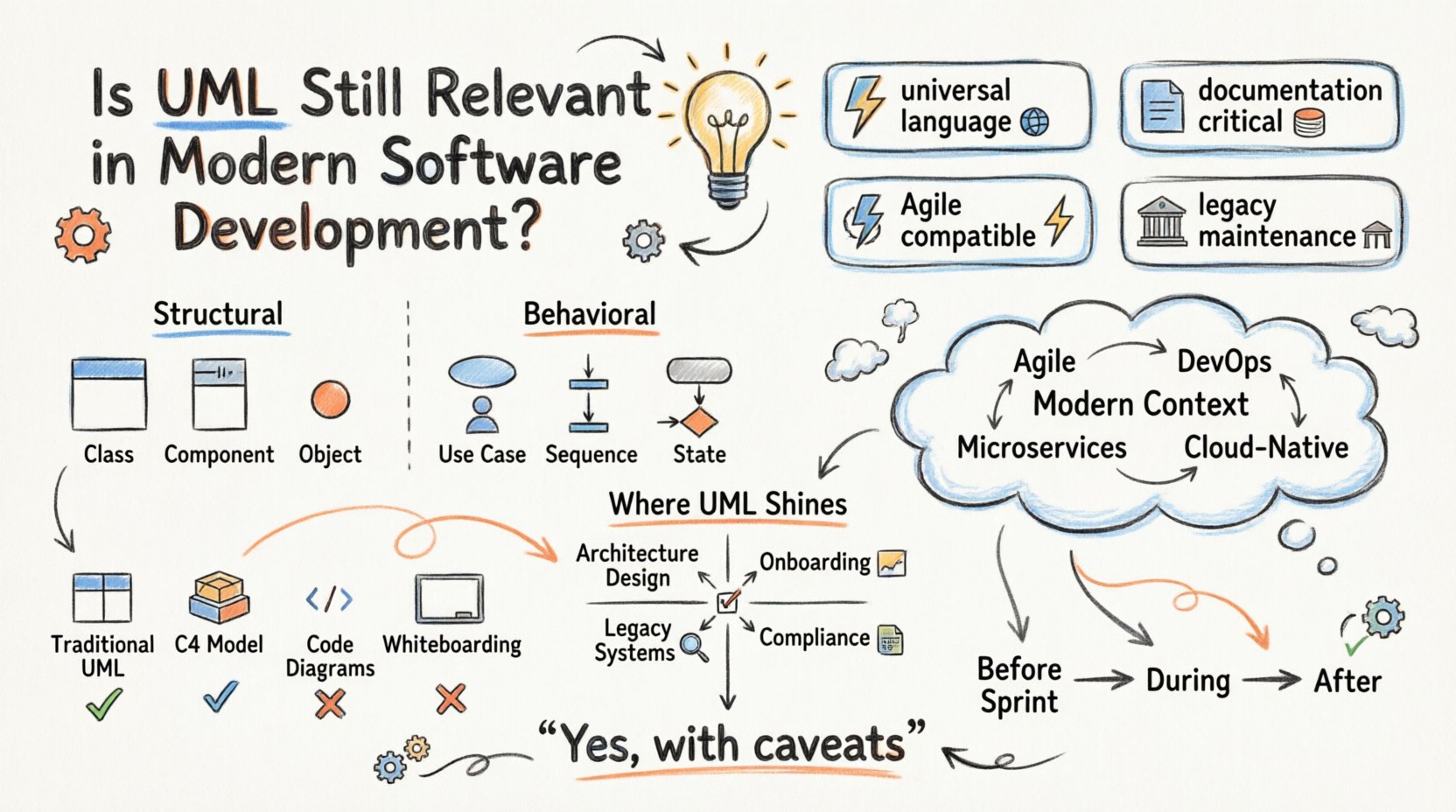
- UML serves as a universal language: It bridges communication gaps between stakeholders, developers, and business analysts regardless of programming languages.
- Documentation remains critical: Visualizing architecture helps onboard new team members and maintain complex systems over time.
- Agile compatibility exists: Lightweight diagramming fits within sprints when focused on high-level architecture rather than exhaustive detail.
- Legacy maintenance needs UML: Older systems often lack code clarity, making models the primary source of truth for understanding logic.
Since its inception in the 1990s, Unified Modeling Language (UML) has stood as the standard for visualizing, specifying, constructing, and documenting software systems. However, the landscape of technology has shifted dramatically. We now live in an era defined by agile methodologies, microservices, containerization, and continuous integration pipelines. The question arises: has the traditional modeling language become obsolete, or does it still hold value in the 21st century? 🏗️
This article examines the current state of UML within modern development practices. We will explore where it excels, where it falls short, and how it fits into the broader ecosystem of software architecture.
Understanding the Core of UML 🧩
Before debating its relevance, it is essential to understand what UML actually is. It is not a programming language, nor is it a specific tool. It is a standardized modeling language that provides a set of graphical notation techniques to create visual models of software systems. These models help in understanding complex structures and behaviors before writing a single line of code.
The language consists of various diagram types, each serving a specific purpose:
- Structural Diagrams: These focus on the static structure of the system. Examples include Class Diagrams, Component Diagrams, and Object Diagrams.
- Behavioral Diagrams: These focus on the dynamic behavior of the system. Examples include Use Case Diagrams, Sequence Diagrams, and State Machine Diagrams.
For decades, these diagrams were the primary artifact handed off between designers and engineers. They provided a blueprint that ensured everyone understood the intended outcome.
The Shift in Development Paradigms 🔄
The rise of Agile and DevOps fundamentally changed how software is built. The traditional waterfall model relied heavily on upfront documentation and planning, where UML flourished. In contrast, Agile prioritizes working software over comprehensive documentation. This shift led many to believe that UML was too heavy and slow for modern needs.
Furthermore, the complexity of modern systems has evolved. We no longer build monolithic applications running on a single server. We build distributed systems across cloud environments. Microservices require clear boundaries and communication protocols that are often harder to capture in static class diagrams. The speed of iteration in continuous deployment pipelines often makes maintaining detailed diagrams difficult, as they can quickly become out of sync with the codebase. ⏳
Code-first approaches have gained traction. Many developers prefer to start with code and refactor to reveal the architecture, rather than designing everything visually first. This is sometimes referred to as “code as documentation.” While this works well for small teams or greenfield projects, it often breaks down as systems scale.
Where UML Remains Essential 🛡️
Despite the criticisms, UML retains significant value in specific scenarios. It is not a one-size-fits-all solution, but rather a tool that fits specific niches within the development lifecycle.
1. System Architecture and High-Level Design
When designing a new system, especially one with multiple teams working on different components, a shared understanding is vital. UML sequence diagrams and component diagrams help visualize how different services interact. This is crucial for defining APIs and data contracts before implementation begins. Without this visual agreement, teams may build incompatible interfaces, leading to integration failures later. 📉
2. Onboarding and Knowledge Transfer
Software is often more complex than the code itself. New developers joining a project need to understand the flow of data and the responsibilities of different modules. Reading through thousands of lines of code is inefficient. A well-maintained class diagram or state diagram can condense weeks of code review into minutes of reading. In this context, UML acts as a map for navigating a complex digital territory. 🗺️
3. Legacy System Maintenance
Many enterprises rely on systems built decades ago. These systems often suffer from “documentation drift,” where the original design documents are lost or outdated. In such cases, reverse engineering tools can generate UML models from existing code. These models become the only reliable source of truth for understanding the system’s logic, making UML indispensable for maintaining critical infrastructure. 🏛️
4. Regulatory and Compliance Requirements
Certain industries, such as healthcare, finance, and aviation, require rigorous documentation for compliance. Auditors need to understand the system logic, data flow, and security boundaries. UML provides a standardized way to present this information, ensuring that the system meets regulatory standards. In these contexts, the visual language is a legal and operational necessity. 📜
Limitations and Modern Challenges 🚧
While UML has its strengths, ignoring its limitations leads to failure. The primary issue is maintenance. Diagrams are static artifacts, while software is dynamic. If a developer changes a class structure but forgets to update the diagram, the documentation becomes misleading. Misleading documentation is worse than no documentation at all, as it creates false confidence.
Another limitation is the learning curve. UML syntax can be complex for junior developers. If a team spends more time drawing diagrams than writing code, productivity suffers. The balance between abstraction and implementation is delicate. Over-engineering a model can lead to “analysis paralysis,” where the project stalls waiting for the perfect design.
UML vs. Modern Diagramming Techniques 🆚
Modern tools and methodologies offer alternatives to traditional UML. Some teams prefer lightweight notations or code-based diagramming. Here is a comparison of approaches:
| Approach | Best Used For | Pros | Cons |
|---|---|---|---|
| Traditional UML | Complex architecture, legacy systems | Standardized, detailed, tool support | High maintenance, steep learning curve |
| C4 Model | Microservices, high-level architecture | Simplified, focuses on context and containers | Less granular than UML |
| Code-based Diagrams | Documentation automation | Always up-to-date, version controlled | Requires tooling integration |
| Whiteboarding | Brainstorming, quick alignment | Fast, collaborative, low friction | Not persistent, hard to scale |
The C4 model, for instance, has gained popularity as a simpler alternative for cloud-native architectures. It focuses on four levels: Context, Containers, Components, and Code. It strips away the complexity of UML while retaining the ability to communicate structure. However, it does not replace the need for detailed behavioral diagrams in complex logic scenarios.
Integrating Modeling into Agile Workflows 🏃♂️
How can teams use UML without slowing down Agile sprints? The answer lies in abstraction and timing. Teams should not attempt to diagram every class. Instead, they should focus on:
- Before the Sprint: Use diagrams to plan the architecture of a new feature or module.
- During the Sprint: Focus on code. Update diagrams only when significant structural changes occur.
- After the Sprint: Review the diagrams to ensure they match the deployed code. Use this as a quality gate.
Tools that support “live” diagramming, where the visual model updates as code changes, help mitigate the maintenance burden. This ensures the documentation remains a reflection of the reality rather than a relic of the past.
The Future of Visual Modeling 🚀
As AI and machine learning integrate into development workflows, the role of modeling may evolve. AI assistants can potentially generate diagrams from codebases or suggest architectural improvements based on patterns. This does not render UML obsolete but rather automates the creation and maintenance of it.
The future likely belongs to a hybrid approach. Developers will use code as the source of truth but rely on visual abstractions for communication. UML will remain the vocabulary for these abstractions, even if the medium of creation changes. The core value of UML is not the drawing itself, but the shared mental model it creates among the team. 🧠
Final Thoughts on Relevance ✅
Is UML still relevant? The answer is yes, but with caveats. It is not the default for every project, especially small startups or proof-of-concept applications. However, for complex, large-scale, or regulated systems, it remains an invaluable asset. It forces clarity of thought and provides a common language for diverse teams.
The key is not to use it for the sake of using it. It should be applied where it adds value to communication and understanding. When used judiciously, UML complements modern development practices rather than conflicting with them. It is a bridge between abstract design and concrete implementation, and that bridge is still necessary in an increasingly complex digital world. 🌉