


In modern library management systems (LIS), accurate tracking of physical assets like books is critical for operational efficiency, user satisfaction, and compliance. A single book may undergo multiple status changes over its lifetime—being checked out, returned, damaged, lost, or withdrawn—each requiring precise handling and business rule enforcement.
To address this complexity, UML State Machine Diagrams offer a powerful, standardized way to model the dynamic behavior of a Book object throughout its lifecycle. This article presents a real-world case study on modeling the full lifecycle of a library book using UML, demonstrating how state diagrams ensure consistency, enable automation, and bridge communication between technical and non-technical stakeholders.
🔍 The Core Challenge: Why Modeling Matters
Without a formal behavioral model, library systems risk:
-
Incorrect inventory reports (e.g., a “lost” book still appearing as available).
-
Missed overdue notifications, leading to patron dissatisfaction and lost fines.
-
Inconsistent return processing, such as re-shelving damaged books.
-
Compliance failures during audits due to unclear or undocumented status transitions.
These issues stem not from poor data, but from ambiguous or unenforced business logic. The solution lies in defining the dynamic behavior of a book through a UML State Diagram—a visual specification that captures when and how a book changes state in response to real-world events.
🧩 Understanding UML State Diagrams: Key Concepts
UML State Machine Diagrams (also known as statecharts) are ideal for modeling objects with well-defined lifecycles. They represent:
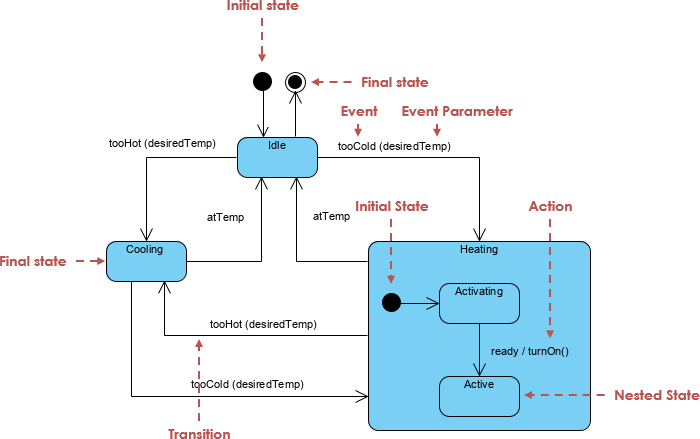
| Element | Description |
|---|---|
| State | A distinct condition (e.g., “Available”, “CheckedOut”). Can include entry actions, exit actions, and ongoing activities. |
| Transition | An arrow from one state to another, triggered by an event, optionally guarded by a condition (guard), and optionally accompanied by an action. |
Initial Pseudostate ([*]) |
The starting point of the lifecycle. |
| Final State (bull’s-eye) | The terminal state; once reached, the object’s lifecycle ends (in modeling terms). |
| Entry Action | A description of what happens when entering a state (e.g., “Book is on shelf and ready for checkout”). |
This model is both descriptive (documents business rules) and prescriptive (can drive code generation, testing, and automation).
📚 The Library Book Lifecycle: A Complete UML State Diagram
Below is a production-ready UML state machine for a library book, designed to reflect real-world library workflows with precision and clarity.
✅ Initial State
[*] --> Available
A newly acquired or freshly processed book begins its life on the shelf.
🟢 Available
Entry Action: Book is on shelf and ready for checkout
-
Transition:
→CheckedOut
Event:Check Out
Guard:[Patron requests book]
Action:/ Assign due date
When a patron requests the book, it transitions to “CheckedOut” with a due date assigned.
🟡 CheckedOut
Entry Action: Patron has borrowed the book; due date assigned
-
Transitions:
-
→
Overdue
Event:Due Date Passed
Guard:[No return by due date]
Action:/ Update status to overdue -
→
ReturnedInProcessing
Event:Return Book
Action:/ Initiate processing
-
The book is now in the patron’s possession. If not returned on time, it becomes overdue. Otherwise, it enters the return processing phase.
🔴 Overdue
Entry Action: Book is past due date and not yet returned
-
Transition:
→ReturnedInProcessing
Event:Return Book
Action:/ Process return
Even if overdue, the book can still be returned—triggering the same processing workflow.
🟡 ReturnedInProcessing (Central Decision Hub)
Entry Action: Book has been returned and is being processed
This is the critical quality control point after every return. The book is physically back but not yet re-shelved. Five possible outcomes:
-
→
Available
Event:Complete Processing
Guard:[No damage, not lost]
Action:/ Re-shelve book -
→
Lost
Event:Confirm Loss
Action:/ Mark as lost -
→
DamagedBeyondRepair
Event:Assess Damage
Guard:[Book severely damaged]
Action:/ Send for disposal -
→
Withdrawn
Event:Decision to Withdraw
Guard:[Book outdated or low value]
Action:/ Remove from collection -
→
RemovedFromCollection
Event:Finalize Removal
Action:/ Archive permanently
This hub prevents premature re-shelving and enforces business decisions based on condition, value, or policy.
⚪ Terminal State: RemovedFromCollection
Entry Action: Book is permanently out of circulation
This final state is reached via any of the following paths:
-
Lost→RemovedFromCollection -
DamagedBeyondRepair→RemovedFromCollection -
Withdrawn→RemovedFromCollection
Final Action: / Update records, dispose of item, archive metadata
Once here, the book is no longer part of the active collection. Records are preserved for audit and historical tracking.
🛠️ How to Build This Diagram: The AI Co-Pilot Approach
Traditional diagramming requires manual drawing, alignment, and validation—time-consuming and error-prone. Enter Visual Paradigm’s AI Chatbot, a game-changing co-pilot for UML modeling.
✅ Step-by-Step Workflow Using AI
1. Open the AI Chatbot
Access the AI tool via:
-
Visual Paradigm Desktop/Web Edition → AI Toolbox
-
Or visit: https://chat.visual-paradigm.com
No coding or UML syntax knowledge required.
2. Generate the Diagram with One Prompt
Paste this natural language description:
“Create a UML state machine diagram for the lifecycle of a library book. States: Available (entry: Book is on shelf and ready for checkout), CheckedOut, Overdue, ReturnedInProcessing, Lost, DamagedBeyondRepair, Withdrawn, RemovedFromCollection. Initial state to Available. Transitions:
Available → CheckedOut on Check Out [Patron requests book] / Assign due date
CheckedOut → Overdue on Due Date Passed [No return by due date] / Update status to overdue
CheckedOut → ReturnedInProcessing on Return Book / Initiate processing
Overdue → ReturnedInProcessing on Return Book / Process return
ReturnedInProcessing → Available on Complete Processing [No damage, not lost] / Re-shelve book
ReturnedInProcessing → Lost on Confirm Loss / Mark as lost
ReturnedInProcessing → DamagedBeyondRepair on Assess Damage [Book severely damaged] / Send for disposal
ReturnedInProcessing → Withdrawn on Decision to Withdraw [Book outdated or low value] / Remove from collection
All of the above → RemovedFromCollection on Finalize Removal / Update records
Make RemovedFromCollection the final state.”
👉 Result: A fully compliant, editable UML state diagram in seconds.
3. Iterate with Natural Language
Refine the model through conversation:
-
“Add entry actions to all states matching the descriptions I provided.”
-
“Change the guard on the overdue return transition to [Book returned after overdue period].”
-
“Generate Java code using the State Design Pattern.”
-
“Export this diagram into my current Visual Paradigm project under the ‘Library System’ package.”
No redrawing. No repositioning. Just conversational refinement.
4. Validate & Extend
Ask the AI:
-
“Validate this state machine against UML 2.5 standards.”
-
“Suggest missing transitions for a damaged-but-repairable scenario.”
-
“Generate test cases for each transition.”
The AI can simulate the state machine, detect unreachable states, or suggest improvements.
✨ Why This Approach Wins: Benefits of AI-Augmented Modeling
| Benefit | Explanation |
|---|---|
| Speed | From idea to professional diagram in under 60 seconds (vs. 15–30 minutes manually). |
| Accuracy | AI enforces correct UML syntax: events, guards, actions, entry behaviors. |
| Collaboration | Librarians and business analysts can describe workflows in plain English. The AI translates them into precise models. |
| Iteration Without Rework | Changes are conversational—no need to delete connectors or reposition states. |
| Integration | Diagrams are instantly saved to your Visual Paradigm project, ready for code generation, documentation, or team review. |
💡 Pro Tip: Many teams start with a PlantUML text version for rapid prototyping, then paste the same description into the AI Chatbot to generate a polished, visual, and maintainable diagram in the native tool.
📌 Conclusion: From Model to Impact
The UML state diagram for a library book is more than a diagram—it’s a living specification that:
-
Ensures consistency in status handling across the system.
-
Enables automated workflows (e.g., overdue alerts, return processing).
-
Serves as a shared language between developers, librarians, and auditors.
-
Drives correct code generation (e.g., State Pattern in Java/Python).
-
Supports compliance, auditing, and reporting.
By combining rigorous UML modeling with AI-powered co-piloting, organizations can transform complex business logic into clear, executable, and maintainable specifications—fast, accurately, and collaboratively.
📎 Final Takeaway
“A book’s journey doesn’t end when it’s returned—it begins when it’s processed. Model the journey, and you’ll never lose track of the story.”
Use UML state diagrams to bring clarity to complexity. Let AI be your co-pilot. And build library systems that don’t just manage books—they understand them.
Ready to get started?
👉 Visit: https://chat.visual-paradigm.com
👉 Try the AI Chatbot today and model your first state machine in under a minute.